LiveRamp Local Encoder
The LiveRamp Local Encoder allows you to access some of the benefits of LiveRamp Activation or Addressability solutions without having to move your consumer data outside of your control.
Local Encoder enables you to generate securely encoded RampIDs for your consumer data files within your own cloud environment and then utilize that data for activation or addressability use cases, depending on your needs. In this way, your consumer data is never exposed to an external network, while still enabling full use of the LiveRamp solutions. The encoded RampIDs produced by the application cannot be decoded back to the original consumer identifiers.
Depending on your needs, the Local Encoder has several RampID output options that determine how the Local Encoder generates your output file:
RampID packets: Used for Activation by brands and marketers, these RampID packets can be delivered to LiveRamp, where they can be transformed into RampIDs and used to generate fields and segments in your LiveRamp application.
Identity envelopes: Typically used by publishers and platforms that want to get RampIDs into the bidstream to safely engage with the programmatic advertising ecosystem.
Note
Identity envelope output is only available with Local Encoder Version 1.6 or later.
RampIDs: Typically used by publishers and platforms that want to create a RampID mapping.
See the diagrams below for the differences between LiveRamp-hosted ID creation and Local Encoder ID creation (RampID packet example shown).
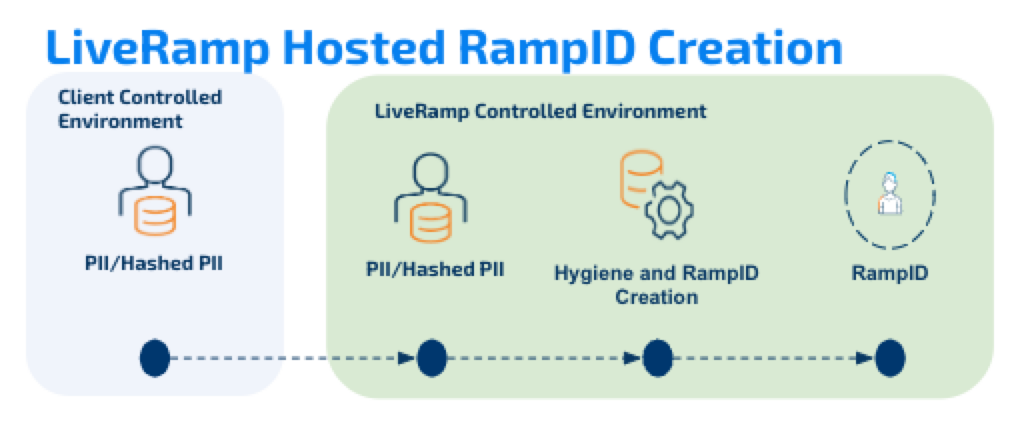

Local Encoder is run as a Docker image, distributed via the AWS Elastic Container Registry. Local Encoder can be run on any infrastructure that supports running Docker images. Contact your LiveRamp representative to see if the Local Encoder is suitable for your needs.
For more information, see this article in the LiveRamp Identity documentation site.
Supported Input/Output Combinations
Local Encoder supports 12 input/output combinations: 3 input sources and 4 output destinations:
Input Sources
Local Folder: Files on local filesystem
AWS S3 (Client): Customer's S3 bucket (prefix: s3://)
Google Cloud Storage: GCS bucket (prefix: gs://)
Output Destinations
Local Folder: Files written to local filesystem
S3 Client (Customer S3): Customer's S3 bucket (prefix: s3://)
S3 LR (LiveRamp S3): LiveRamp's S3 bucket (prefix: s3lr://)
Google Cloud Storage: GCS bucket (prefix: gs://)
Complete I/O Combinations
Input Source | Output Destination | Profile | Skip Detection |
|---|---|---|---|
Local | Local | localInput + localOutput | Scans local output directory |
Local | S3 Client | localInput + s3ClientOutput | Lists S3 Client bucket objects |
Local | S3 LR | localInput + s3LrOutput | Lists S3 LR bucket objects |
Local | GCS | localInput + gcsOutput | Lists GCS bucket blobs |
S3 Client | Local | s3Input + localOutput | Scans local output directory |
S3 Client | S3 Client | s3Input + s3ClientOutput | Lists S3 Client output bucket |
S3 Client | S3 LR | s3Input + s3LrOutput | Lists S3 LR output bucket |
S3 Client | GCS | s3Input + gcsOutput | Lists GCS output bucket |
GCS | Local | gcsInput + localOutput | Scans local output directory |
GCS | S3 Client | gcsInput + s3ClientOutput | Lists S3 Client bucket objects |
GCS | S3 LR | gcsInput + s3LrOutput | Lists S3 LR bucket objects |
GCS | GCS | gcsInput + gcsOutput | Lists GCS output bucket |
Input/Output Configuration Examples
Combination | LR_VAULT_INPUT | LR_VAULT_OUTPUT |
|---|---|---|
Local → Local | /data/input | /data/output |
Local → S3 Client | /data/input | s3://customer-bucket |
Local → S3 LR | /data/input | s3lr://liveramp-bucket |
Local → GCS | /data/input | gs://gcs-bucket |
S3 → Local | s3://input-bucket | /data/output |
S3 → S3 Client | s3://input-bucket | s3://output-bucket |
S3 → S3 LR | s3://input-bucket | s3lr://liveramp-bucket |
S3 → GCS | s3://input-bucket | gs://output-bucket |
GCS → Local | gs://input-bucket | /data/output |
GCS → S3 Client | gs://input-bucket | s3://customer-bucket |
GCS → S3 LR | gs://input-bucket | s3lr://liveramp-bucket |
GCS → GCS | gs://input-bucket | gs://output-bucket |