Announcement: Possible Action on TikTok Destination Accounts Needed by December 15, 2026 (11/9/26)
As previously announced on October 26, 2026, LiveRamp and TikTok have upgraded our integration to deliver audience data through a direct, continuously-updated API stream. This brings faster audience delivery, greater stability, and faster and easier issue resolution.
As part of this transition, LiveRamp needs to send backfills for any existing audience segments you intend to continue using in TikTok Audience Manager. For your account, we’ve identified that a backfill is being prevented for one or more of your audiences in TikTok Audience Manager due to one or both of the scenarios shown below.
To ensure that these audiences stay updated in TikTok Audience Manager. review and address any issues that may apply to your TIkTok destination accounts or segment deliveries before December 15, 2026.
Note
If a destination account or segment was inactivated on purpose and is no longer needed for TikTok, no action is required.
If you have any questions, contact your LiveRamp representative.
Potential Scenario: Expired or Invalid OAuth Connection
LiveRamp uses your TikTok OAuth connection to update audiences in TikTok on your behalf. If the OAuth connection for a specific TikTok destination account has expired or is no longer valid, we cannot complete the backfill or keep those audiences updated in the future.
To resolve this:
In Connect, navigate to the Destination Accounts page, and search for “TikTok” to see all of your TikTok destination accounts.
Check the Status column. Destination accounts with a status of “Needs Attention” have an expired or invalid connection.
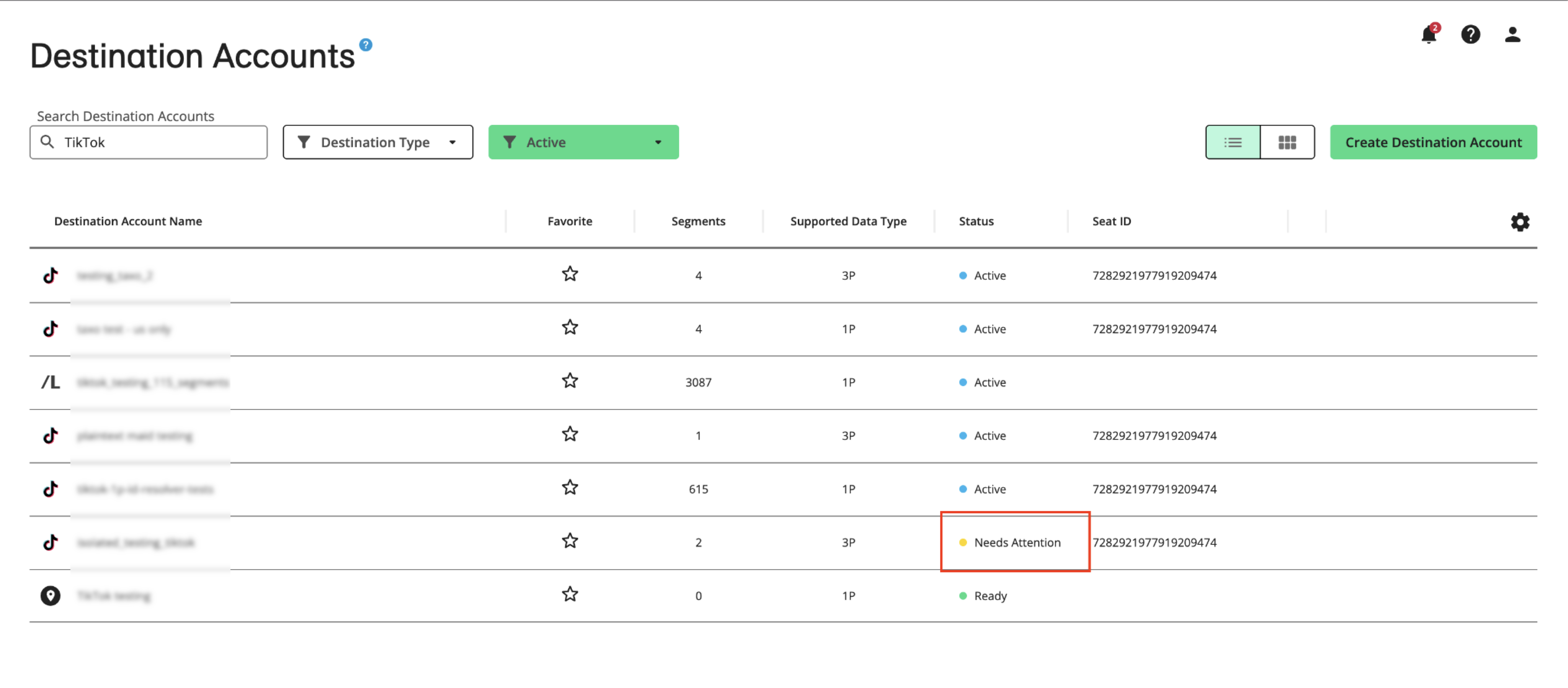
From the More Options menu that appears when you hover over the row for one of the impacted accounts, select Settings.
In the “OAuth Connection” section, open the dropdown and select Create New OAuth Connection.
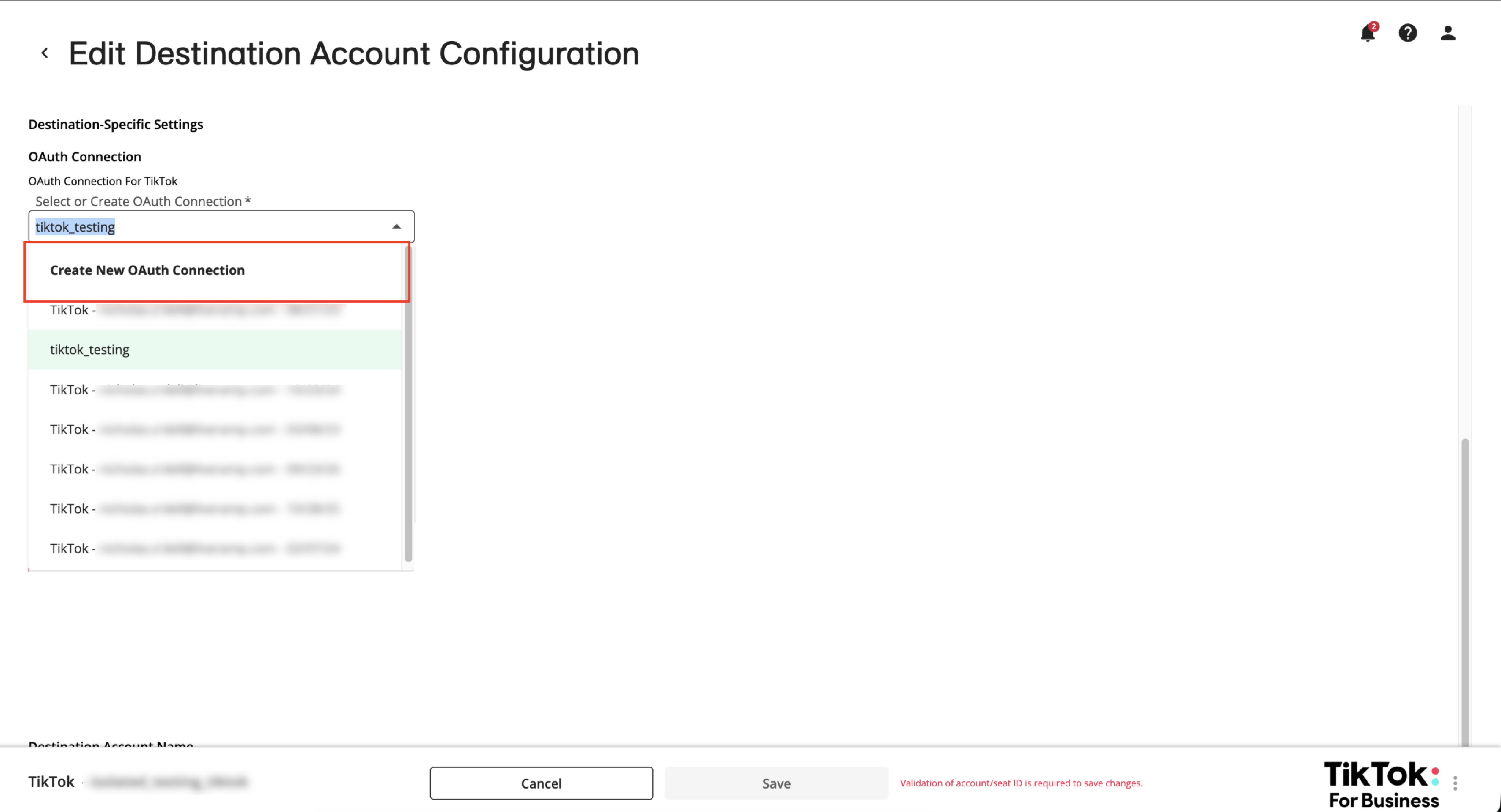
Follow the steps in this article to perform OAuth authorization for TikTok.
For all other affected TikTok destination accounts, navigate to the settings and select the new OAuth connection created in the previous steps.
Note
Alternatively, you can also reauthenticate an invalid or expired OAuth connection in the “Connections” tab on the Company Settings page. For more information, see “Reauthenticate an OAuth Connection”.
Potential Scenario: Inactive TikTok Destination Account or Segment
If one of your TikTok destination accounts has been deactivated, or if segment a within it has been recently removed from distribution, LiveRamp cannot deliver audience updates to TikTok for that destination account or segment.
Note
If a destination account or segment was inactivated on purpose and is no longer needed for TikTok, no action is required.
To resolve this:
In Connect, navigate to the Destination Accounts page, and search for “TikTok” to see all of your TikTok destination accounts.
At the top, open the preselected “Active” filter and change to “Inactive” to view all your inactive TikTok destination accounts.

For any destination accounts which contain segments that should still support audiences you use in TikTok Audience Manager, open its settings, change the Status to Active, and set an appropriate End Date.
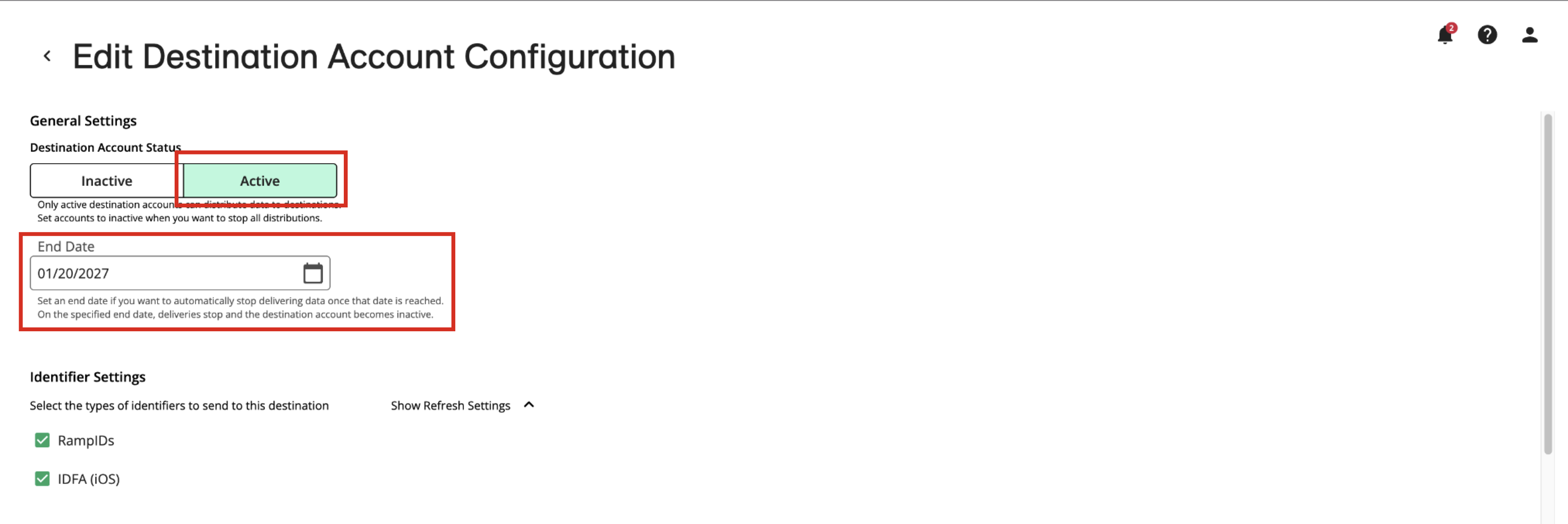
Click .
For each of your TikTok destination accounts, go to the Manage Segments page by selecting Manage Segments from the More Options menu that appears when you hover over the row and then ensure that any segments that are important to future TikTok campaigns are active.