Meta Incrementality Insights for Retail Media Networks
LiveRamp Clean Room helps Retail Media Networks (RMNs) measure the impact of their Meta campaigns by connecting Meta campaign data with their own first-party sales data. This gives RMNs and their brand partners visibility into how Meta influences sales, orders, and ROAS across campaigns, brands, and products, within a neutral, privacy-safe environment.
Incrementality is one of several Meta campaign insights available through LiveRamp Clean Room, alongside attribution, halo analysis, and buyer insights.
The Incrementality insight currently uses Meta’s holdout-based Partner Lift study design to measure whether a campaign drove a true change in consumer behavior, beyond what would have happened without ad exposure. Unlike traditional attribution, which helps explain which touchpoints received credit for a conversion, Incrementality is designed to estimate causal impact. As a result, the output reflects incremental performance, not just attributed performance.
What Incrementality Insights Measures
The core output of Incrementality insights is a Lift Calculation report that quantifies the causal impact of Meta media on RMN-defined conversion outcomes. The report also includes a pre-campaign balance check to confirm that the treatment and control groups were comparable before exposure began, which validates the reliability of the lift result.
Depending on the conversion setup, the offering can measure outcomes across several conversion types:
Binary conversions (whether a user converted at least once during the measurement window)
Number of orders
Transaction amount
Transaction quantity
Weekly conversion metrics based on conversion date
In practical terms, this means the program can support sales lift use cases such as:
Estimating whether Meta drove incremental purchases
Estimating incremental revenue or transaction value
Helping RMNs distinguish between true lift and performance that only appears strong in attribution dashboards
Note
LiveRamp can support up to 10 campaigns per study.
Prerequisites
The RMN must meet the following prerequisites:
The RMN must be confirmed as a Meta Managed Service account.
The RMN must have the following information:
Study date range, Meta ad account ID, published campaign IDs, estimated CPM, campaign spend, estimated impressions, estimated reach, planned frequency, and holdout percentage.
A baseline conversion rate, or a buyer-rate proxy when a historical campaign baseline is not available.
Agency contacts, if an agency helps manage the campaign, so they can validate details such as spend, reach, and campaign IDs.
Meta Contact to ensure their is Marketing Data Science Resource to set up the studies
Steps to Get Set Up
Before implementation, the following steps are performed to get the study set up:
Confirm eligibility: LiveRamp works with Meta to confirm that the account can be supported for Partner Lift.
Lock campaign details and confirm planning readiness: You make sure the following steps have been performed:
Campaign details should be finalized and published in Meta Ad Manager.
Campaign spend should be treated as a study requirement, not just a planning input, since insufficient spend can limit feasibility.
Plan at least two weeks of lead time before launch to allow for feasibility review, study setup, and coordination with Meta.
Validate key planning inputs early, including CPM, estimated impressions, estimated reach, target frequency, holdout percentage, and baseline conversion rate or buyer-rate proxy.
Note
Changes to campaign IDs, budgets, or other setup details after this point can delay launch and require re-confirmation.
Complete feasibility review: LiveRamp and Meta review the campaign inputs and confirm feasibility.
Start the joint kickoff: After feasibility is confirmed, LiveRamp opens a three-way thread between LiveRamp, the client, and Meta to confirm campaign details, align on launch timing, and have Meta create Study IDs.
Prepare for implementation: Once study IDs are created and the study files are ready at the end of the campaign, LiveRamp retrieves the study data, loads it into the clean room, and prepares the environment needed for analysis.
Note
During implementation, LiveRamp handles the following areas:
Consultations on campaign feasibility.
Retrieval and data management of the study (test and control) files provided by Meta for each campaign.
Configuration of the datasets and field mappings needed to run the incrementality workflow.
Reviewing Campaign Feasibility
Before kickoff, LiveRamp uses a feasibility calculator to assess whether the proposed campaign is likely to support a reliable incrementality read. The review evaluates whether the campaign has sufficient scale across audience size, reach, expected conversions, and media investment to produce a dependable lift result rather than only a directional signal.
In practice, the feasibility review answers three core questions: whether the overall audience is large enough, whether the planned media budget is appropriate for the study, and whether the campaign design is strong enough to support a formal lift test.
If a campaign falls below the feasibility threshold, LiveRamp may recommend changes before launch, such as increasing budget, extending campaign duration, broadening or consolidating the audience, or positioning the study as directional rather than as a proof-point measurement.
Campaign Requirements
All campaigns for the study must meet the following requirements:
The study must be created before campaign launch.
All study details must be finalized before launch.
The campaign must meet Meta/LiveRamp Requirements
The campaign must end when the study ends to avoid test/control contamination and invalid post-study attribution.
Inputs for the Calculator
The feasibility review is based on campaign inputs provided by the RMN, agency, media plan, and any relevant historical measurement data, where available.
Input | Information Needed | Notes |
|---|---|---|
Planned start date | Campaign start date | Should be finalized before kickoff. |
Planned end date | Campaign end date | Should be finalized before kickoff. |
Campaign ID | Published Meta campaign ID | Must be published before study setup. |
Campaign spend | Planned media spend fee (w/o managed services) for the measured campaign | Used in the feasibility and budget assessment. |
CPM | Expected cost per 1,000 impressions | Best estimate CPM |
Estimated impressions | Expected total impressions across the study flight | Used as an input to feasibility/power assessment. |
Estimated reach | Expected number of individuals reached | Use media plans or recent similar campaign estimates. |
Target frequency (per week) | Planned frequency target per user per week | Common starting points are around 2x per week. |
Holdout % | Percent held out as control | Common splits are 80/20 or 90/10. |
Baseline conversion rate | Conversion rate from a similar campaign in the same period last year. See calc notes. | Core feasibility input. |
Buyer rate | Proxy baseline when no historical BCR exists. See Calc notes. | Calculated based on shoppers who bought a product or brand over total shopping. |
Note
Baseline Conversion Rate = the approximate percentage of people who convert in a similar past campaign (same objective/audience)
Buyer rate = (the number of people who bought the product (e.g., SKU or brands) last year in that time period) ÷ (the number of people who shopped at the store last year in that same time period)
Campaign Tracking
Your LiveRamp representative will share a campaign tracking template for you to fill out with campaign info, feasibility information, and study information (such as ID and holdout).
Campaign tracking in the Meta Partner Lift / LiveRamp workflow is the shared process used to keep campaign setup, study setup, and measurement status aligned across Meta, LiveRamp, and the RMN / agency so a study can be created, monitored, and measured correctly.
Campaign tracking helps in the following ways:
Ensures all parties are working from the same campaign IDs and finalized planning inputs before launch.
Tracks whether a campaign is actually eligible and ready for study creation and later measurement.
Prevents missed or delayed studies caused by incomplete or changing campaign details.
Captures Meta Study ID as LiveRamp will need it later to download the test and control data once the study is completed.
Finding Partner Study ID in Ad Manager
Your Meta rep will provide the Advertiser Study ID once the study is set up. Once you’ve received this, you can use the Advertiser Study ID to find the Partner Study ID in Meta Ads Manager and send it to LiveRamp:
Log in to Meta Ads Manager.
Open the following URL, using the provided Advertiser Study ID in place of "<Advertiser Study ID>": http://business.facebook.com/latest/ads-experiments/results/?nav_ref=ads_experiments_lift_results&study_id=<Advertiser Study ID>
Click Data sources (1) to view the Partner Study ID.
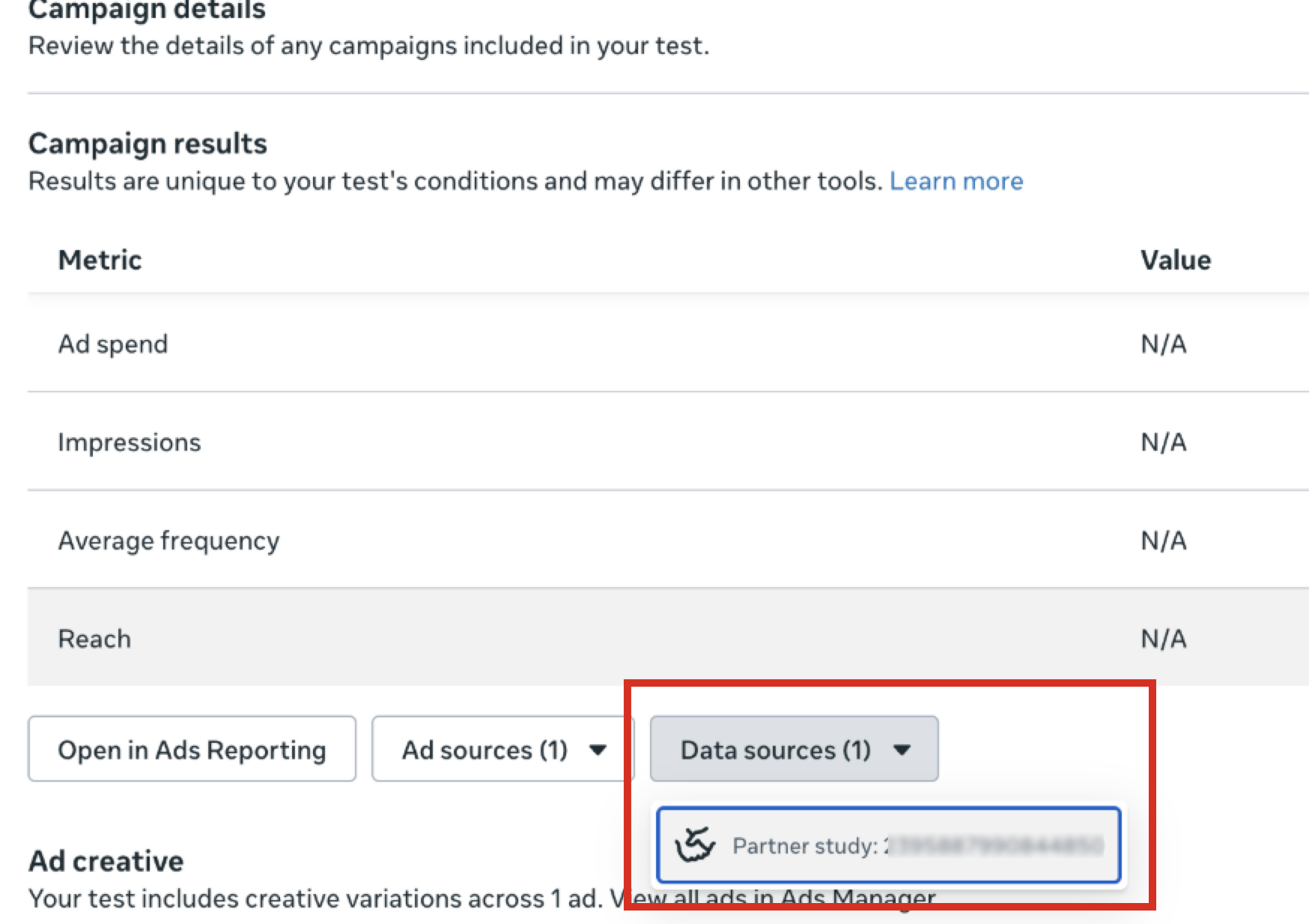
Share the Partner Study ID with your LiveRamp representative.
Receiving and Viewing Results
After the implementation steps are complete, LiveRamp runs the Partner Lift incrementality flow and sends you a Lift Calculation Report. The report shows the causal impact of Meta media on the defined conversion outcomes and confirms whether the treatment and control groups were balanced before the campaign period.
You can export the report results from LiveRamp Clean Room to your cloud environment. You can also view the report as visualizations in LiveRamp Clean Room.
Viewing the Report
The results report LiveRamp sends you contains the following fields:
Note
You can download a sample report here.
Field | Field Type | Description |
|---|---|---|
Campaign id | string | Identifies the measured campaign. |
Cell id | string | Identifies the Meta experimental cell (which is used to map the campaign ID to the study ID). |
Cell Name | string | Label for the experimental cell. |
Study Name | string | Label for the study. |
Measurement Start Date | date | Date the measurement started |
Measurement End Date | date | Date measurement ended |
Conversion Metric Type | string | Name of the conversion metric reported:
|
Study Id | string | Identifies the study. |
Campaign Exposed Scaled | double | Scaled treatment group size. |
Campaign Exposed Converted Scaled | double | Scaled conversion value in treatment group. |
Campaign Unexposed Scaled | double | Scaled control group size. |
Campaign Unexposed Converted Scaled | double | Scaled conversion value size in control group. |
Campaign Exposed Conversion Metric Scaled | double | Scaled treatment rate/mean. |
Campaign Unexposed Conversion Metric Scaled | double | Scaled control rate/mean. |
Relative Lift Scaled | double | (scaled_exposed_rate/scaled_unexposed_rate) - 1. |
Incremental Impact Scaled | double | Rate difference × scaled treatment size. |
Scaled Relative Lift Test Statistic | double | Test statistic for the relative lift calculation. |
Scaled Relative Lift Ci Lower | double | Lower bound of the confidence interval. |
Scaled Relative Lift Ci Upper | double | Upper bound of the confidence interval. |
Scaled Relative Lift Is Significant | boolean | Indicates whether the result is statistically significant |
P Value | double | Two-tailed p-value for relative lift. |
Alpha | double | Significance level used for the test. |
Note
In the future, these reports will support the following conversion cuts:
Brand_name
Product_id
Transaction_category
Exporting Report Results
You can also export the results to the following cloud environments:
AWS
GCS
BigQuery
Azure
To export results, follow the appropriate instructions for your cloud provider in the "Export Results to a Cloud" section of the help documentation.
Viewing Visualizations in the Clean Room
In addition to the report, you can also view the following visualizations in the clean room:
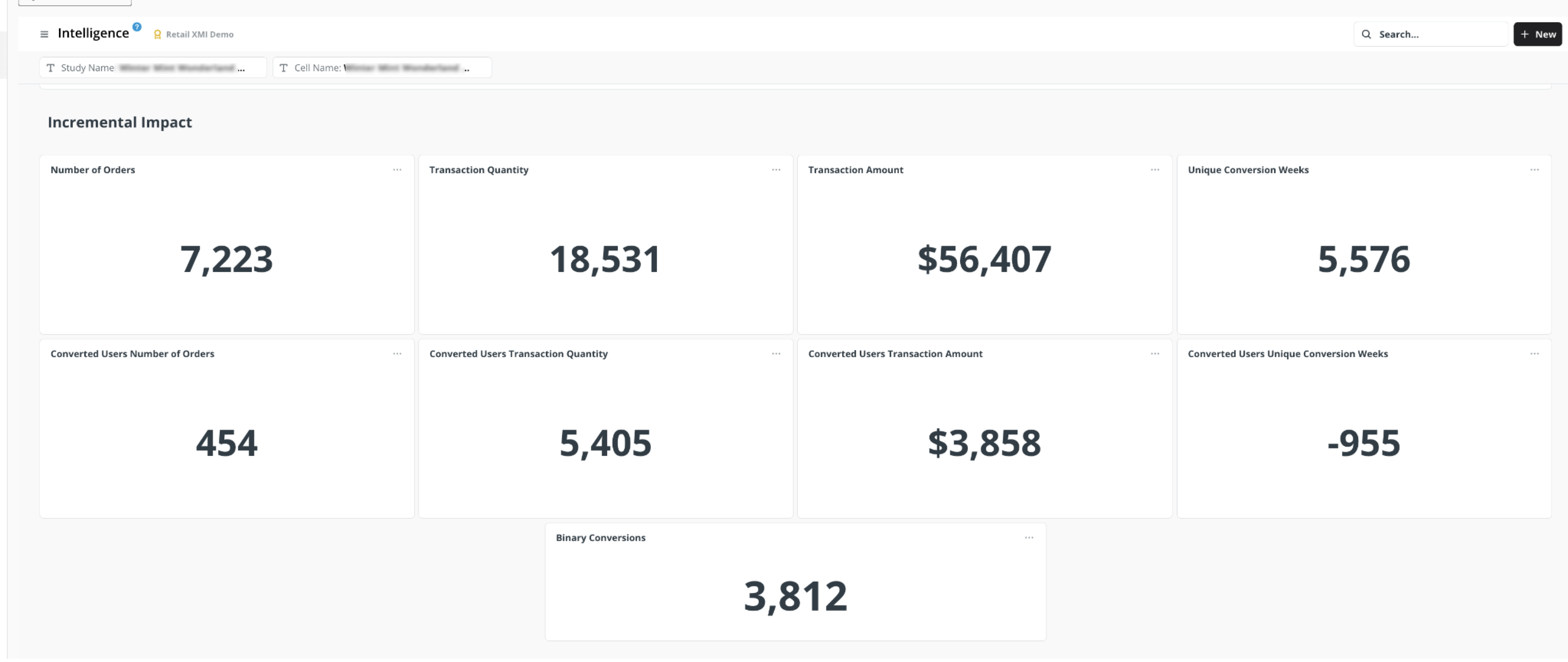
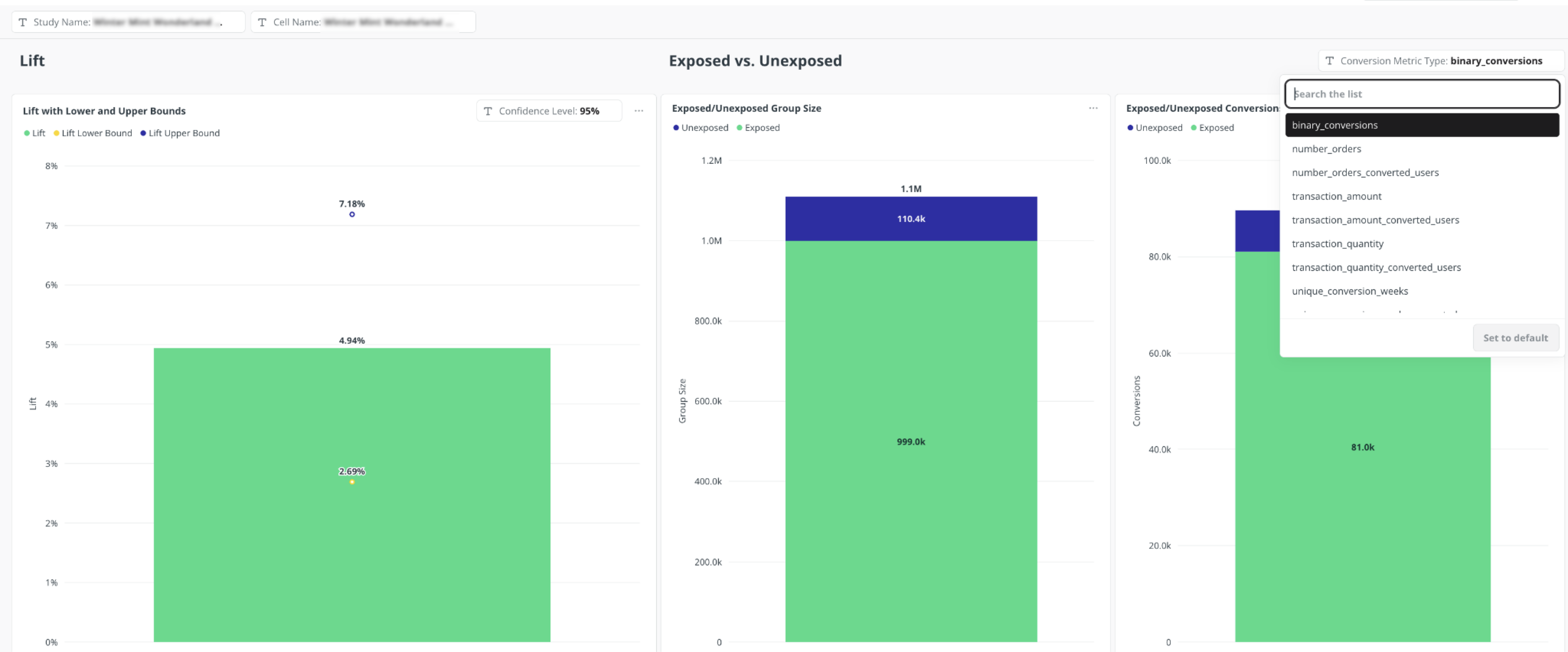
Log in to the following account and organization in LiveRamp Clean Room:
Account: /L Measurement Services - Meta
Organization: /L Measurement Services - Meta & [RMN Name]
From the navigation menu, select Clean Room → Clean Rooms to open the Clean Rooms page.
Enter the clean room "Prod - LiveRamp Measurement Services x Meta x [RMN Name]"
From the clean room navigation menu, select Intelligence.
Select the Media Intelligence Dashboard and then select the Incrementality tab.
FAQs
Start planning before the campaign launches. A recommended best practice is to allow at least two weeks of lead time for campaign feasibility review, study setup, and coordination with Meta.
No. Lift studies require a clean control group that has not been exposed to the campaign from the beginning. If the study is configured after the campaign is already in flight, some users in the control group may have already seen the ads. This can blur the distinction between exposed and unexposed groups and reduce the reliability of the results.
LiveRamp calculator may recommend changes before launch, such as increasing budget, extending duration, broadening or consolidating the audience, or treating the study as directional instead of as a proof-point measurement.
Key inputs typically include study dates, country, Meta ad account ID, published campaign ID, budget, CPM, estimated impressions, estimated reach, target frequency, holdout percentage, and a baseline conversion rate or buyer-rate proxy.
Results can be retrieved either through the clean room or exported back to your cloud environment.
Agency teams often help confirm campaign inputs, approvals, budget, reach estimates, and campaign IDs. Bringing them in early helps reduce setup delays and rework.