Distribute Data Marketplace Data to Google
Data buyers can distribute Data Marketplace custom and standard segments to DV360 and Google Ad Manager.
Data sellers can distribute Data Marketplace standard segments to Google's public third-party data marketplaces (DV360 and Google Ad Manager), as well as distribute Data Marketplace custom segments to specific advertiser accounts within DV360 and Google Ad Manager.
This allows data sellers to share their Data Marketplace segments with multiple clients within DV360 and Google Ad Manager, and manage the process (including segment licensing) through Connect. For more information, see the "Distribute and License Data Marketplace Segments" section below.
Caution
For data sellers: Make sure to include segment descriptions that are clear enough that a reasonable consumer can understand the contents of the segments.
Google enforces minimum and maximum CPM prices (currently $0.10-$70 USD). Segments that do not meet these requirements will not successfully distribute (and will be stuck in the "Queued" stage).
Note
Data sellers can also distribute Data Marketplace data to Google Ad Manager through the Curation with Google Ad Manager [Marketplace] tile. For more information, see "Distribute Data to Google Curation in Google Ad Manager".
On October 22, 2018, Google’s personalized advertising policy was updated with additional requirements for advertisers to show sufficiently established Google Ads or Display & Video 360 account history. For more information, see this Google article.
For data buyers who are looking for Data Marketplace standard segments within Google (rather than distributing those themselves), Google has prepared documentation on where to find third-party segments (including Data Marketplace segments) in a variety of UIs. For more information, see the "Finding Data Marketplace Segments in Google" section below.
Data buyers who want to combine first-party data and Data Marketplace data in Google should contact their Google representative.
All Data Marketplace distributions to Google are first sent to a single LiveRamp-managed account at Google. Segments are then shared either publicly or directly to buyer accounts.
See the sections below for information on distributing Data Marketplace data to Google.
Note
Distributing data with Connect involves activating a destination account for the destination you're distributing to and then adding segments to distribution for that destination account. See the articles below for instructions:
Overview of the Google Data Marketplace Integration
LiveRamp's Google Data Marketplace integration follows the guidelines listed in the table below:
Caution
The information listed below was current at the time of publication and represents our best understanding of the integration based on the information available at the time, including information given to us by the destination platform. Any sections not filled out are areas we did not have information on at the time of publication. Use this as a general guide, but check with the platform to confirm any areas that are critical to your use case.
Category | Area | Info | Notes |
|---|---|---|---|
Delivery/Matching | Identifiers that can be delivered |
| |
Lookback window |
| ||
Time to live |
| ||
Enabled for Record Sync | No | ||
Accepts raw fields | Yes | ||
Duplicate segment names allowed |
| ||
Configuration | Account info needed | Entityid: 8712050210 | |
Requires OAuth authorization | No | ||
Additional data restrictions | Yes | For information about Google's data policies, see Google's "Data Platform Policies". For information about LiveRamp’s standard data restrictions, see "LiveRamp Data Restrictions" and "Data Marketplace Segment Review and Approval". | |
Requires LiveRamp action to activate the destination account | No | ||
Data Marketplace | Accepts Data Marketplace data | Yes | |
Data Marketplace pricing used | Programmatic Standard Pricing | Google enforces minimum and maximum CPM prices (currently $0.10-$70 USD). Segments that do not meet these requirements will not successfully distribute (and will be stuck in the "Queued" stage). | |
Additional Data Marketplace limitations or guidelines | Yes | For information about Google's data policies, see Google's "Data Platform Policies". | |
Additional Information | Can display matched reach in Connect | Yes | |
Limit on the number of audiences per seat ID in the platform | None | ||
Exposure logs available | No | ||
LiveRamp Conversions API program available | Yes | Monetization of offline conversion data on DV360 is supported for retailers through the Google Data Marketplace for Commerce Media Networksintegration. |
Google Data Marketplace Integration Options
When activating a Google Data Marketplace destination account, the following integration options are available:
Use | Data Type | Who It’s For | Integration Name |
|---|---|---|---|
Distributing Data Marketplace segments (third-party data) to Google | Data Marketplace data |
| Google Data Marketplace |
Distributing Commerce Media segments to brands through the Data Marketplace to Google | Data Marketplace data | Retail and Commerce Media Networks | Google - Commerce Media |
Distribute Data Marketplace Data to Google
Data Marketplace data can be distributed to Google in the situations listed below:
Party Distributing | Distribution Type | Integration to Use | Notes |
|---|---|---|---|
Data buyers | Standard segments: Yes | Google Data Marketplace | Data buyers who want to combine first-party data and Data Marketplace data in Google should contact their Google representative. |
Custom segments: Yes | |||
Data sellers | Standard segments: Yes | ||
Custom segments: Yes | |||
Data sellers (including retailers) | Standard segments: Yes | Includes distribution of shell segments required to enable monetization of offline transaction data on DV5360 for retailers. See the "Distributing Shell Segments for CAPI Monetization on DV360" section below for more information. | |
Custom segments: Yes |
To distribute Data Marketplace data to Google, activate the appropriate destination account tile by following the instructions in "Activate a New Destination Account".
Note
Data buyers who want to combine first-party data and Data Marketplace data in Google should contact their Google representative.
Data sellers can also distribute Data Marketplace data to Google Ad Manager through the Curation with Google Ad Manager [Marketplace] tile. For more information, see "Distribute Data to Google Curation in Google Ad Manager".
For information about Google's data policies, see Google's "Data Platform Policies".
Once you've activated the destination account, follow the instructions in the Distribute and License Data Marketplace Segments" section below.
Configure the Required Properties
When activating the destination account, the following fields are required:
Field | Description | Notes |
|---|---|---|
Destination Account Name | The name you want to give to this destination account. | Enter a unique and memorable name for this destination account, or accept the default suggested name. You can use any name you want as long as it is less than 150 characters in length. |
Distribute and License Data Marketplace Segments
To distribute and license Data Marketplace segments to Google:
If you haven't already, activate a "Google Data Marketplace" destination account.
From the Google Data Marketplace destination account, select a Data Marketplace segment and click Add and Share at the bottom of the screen.
Tip
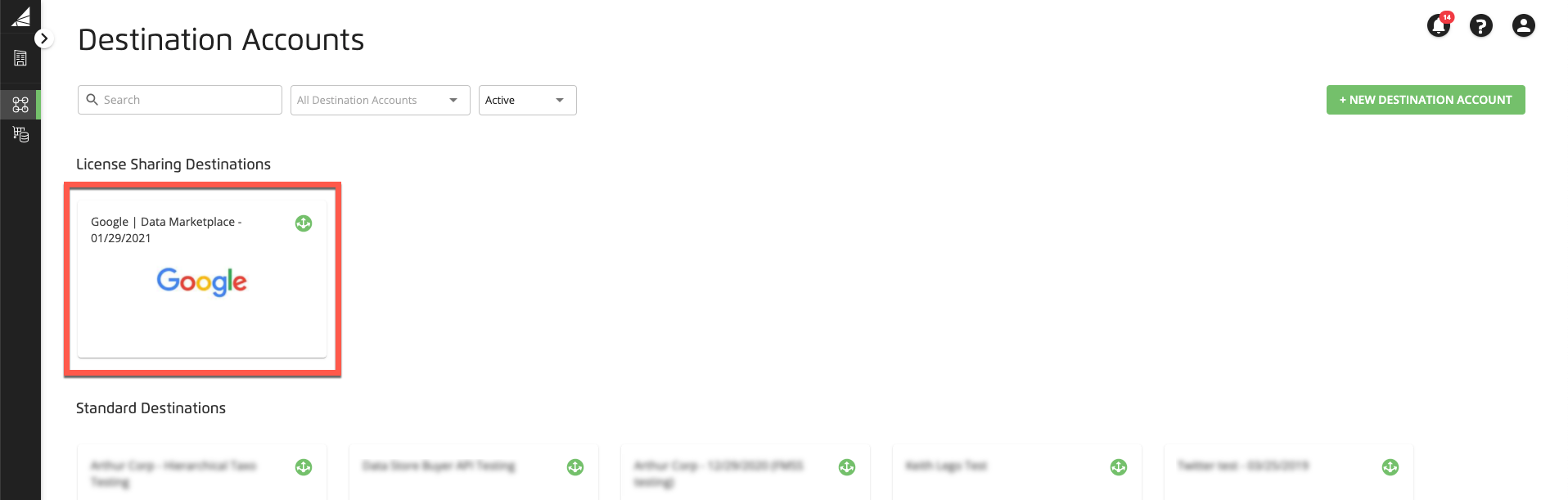
Existing Google Data Marketplace destination accounts will appear under "License Sharing Destinations" if they contain at least one active Data Marketplace segment.
A dialog appears asking you to specify a Google product and customer seat ID.
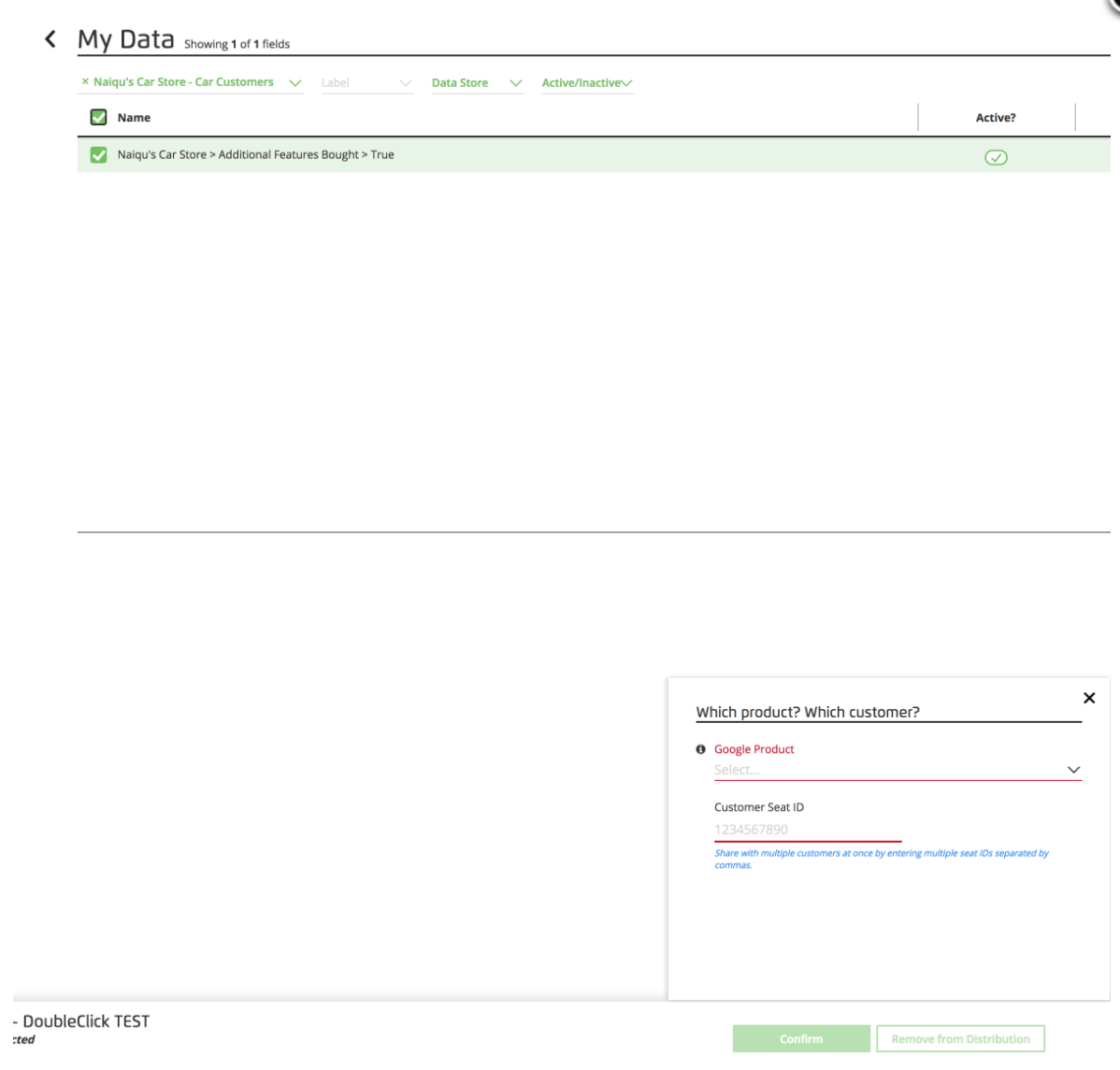
For custom segments being distributed by data sellers: If you're not sure about which product to choose, reach out to the end advertiser for clarification, or click the information icon on the dialog for more info.
Note
If you're distributing a custom segment with a non-U.S. currency on behalf of a customer, there are additional steps that need to be performed before the segment will be available to that customer. For more information, see the "Distributing Data Marketplace Segments to Google in Non-U.S. Currencies" section below.
For standard segments being distributed by data sellers: Select "Google Reseller" as the product and enter "0" as the seat ID. This creates a marketplace-wide global license (reseller/buy-side/sell-side) on Google.
For shell segments required to enable CAPI feed monetization, select "DV360 Advertiser".
Caution
DV360 Advertiser and DV360 Partner are different types of accounts within DV360. Reach out to the advertiser receiving the segments to confirm which product is correct.
After initial licensing, all active segments can be shared with additional Google products or accounts.
You will receive a success or failure email after licensing segments.
Distributing Data Marketplace Segments to Google in Non-U.S. Currencies
LiveRamp's Data Marketplace integration with Google does not automatically support non-U.S. currencies. Custom segments with non-U.S. currencies can be distributed to Google, but because Google is expecting the segments to be priced in US dollars, segments based on other currencies will fail to distribute to Google until LiveRamp performs a manual licensing step.
Once you've distributed a custom segment with a non-U.S. currency, you should receive notice from Google that the distribution has "failed". Once this happens, create a LiveRamp support ticket to have us complete the licensing process in the correct currency in Google's UI.
Distributing Shell Segments for CAPI Monetization on DV360
The Google Data Marketplace for Commerce Media Networks integration allows retailers to monetize their offline transaction data to select brands on DV360. By giving access to your attributed sales data, brands can optimize their campaigns to improve performance and see the value of your audiences.
Note
This program is currently in limited availability. To request access, contact your LiveRamp account representative.
This integration requires you to have a Conversions API feed asset configured in Connect and distributed to Google Campaign Manager 360 destinations. For more information, see "Getting Started with Conversions API Feed Distribution for Retail Media Networks".
To associate the relevant CAPI feed with the correct pricing metadata, each retailer is required to prepare and distribute a shell (dummy) segment using a “Google - Commerce Media” destination account.
Prepare a CSV file which contains a dummy field-value pair that includes the name of your CAPI feed. See the image below for an example:

Upload the CSV to an existing Connect audience to generate the field-value segment. For instructions, see “Upload a File via Connect.
Once uploaded, confirm the field-value pair was created as a segment. From the navigation pane, select Data Management → Segments and confirm the corresponding segment exists.
Enable the segment in the Data Marketplace by following the general steps in "Enable an Individual Data Marketplace Segment", entering the following information:
Segment Name: Use the following naming convention "For Google CAPI (Campaign Manager 360) - [Retailer]>CAPI Feed for Google>[Name of CAPI Feed]".
Description: Provide a clear description indicating this is a shell segment for [Destination] CAPI measurement.
Pricing: Under Programmatic Hybrid, enter the appropriate value in the % of Media for Programmatic field without setting a CPM cap.
Provide the rest of required information as desired.
Once the review is completed and the segment is live, distribute the segment using a "Google – Commerce Media" destination account.
Finding Data Marketplace Segments in Google
For data buyers who are looking for Data Marketplace standard segments within Google (rather than distributing those themselves), Google has prepared documentation on where to find third-party segments (including Data Marketplace segments) in a variety of UIs. Most of their documentation is behind authentication barriers, so you might need logins to the appropriate Google platform to view the links below:
Caution
Third-party data can't be used with Google Search Ads 360, Google Ads, or other Google-owned properties, such as Gmail and YouTube. See this Google article for more information.