Enable Horizontal Scaling to Process Files in Parallel
To improve the processing of large datasets, you can enable horizontal scaling, which processes files in parallel across multiple Local Encoder containers (pods) in a Kubernetes StatefulSet.
Horizontal scaling uses an index-based coordination model. A coordinator pod creates per-pod work index files under a hidden .chp/ control directory, and each pod processes only the files assigned to its own index. Input files remain in place and are not moved into worker-specific folders. For more information, see the “How Horizontal Scaling Works” section below.
Local Encoder still reads its normal configuration and processes data through the existing pipeline. Horizontal scaling changes only how work is assigned across pods.
Horizontal scaling supports all Local Encoder input/output combinations (for more information, see “Supported Input/Output Combinations”. In all supported combinations, horizontal scaling assignments work through per-pod index files rather than moving input files into pod-specific folders.
Note
Horizontal scaling is only available on deployment platforms that support Kubernetes StatefulSet deployments. Horizontal scaling is not supported on other deployment platforms.
Prerequisites
To enable horizontal scaling, the following prerequisites are required:
A working Kubernetes cluster that supports StatefulSets.
A Kubernetes StatefulSet deployment. Horizontal scaling is not supported on other deployment platforms.
LR_VAULT_MODE=default. Horizontal scaling is not supported in task mode.
Shared access to the same input and output storage across all pods.
For local input, all pods must mount the same shared input path.
For cloud input, all pods must access the same S3 or GCS location.
A current Vault App image that includes the work-index horizontal scaling implementation.
How Horizontal Scaling Works
Horizontal scaling uses a coordinator-and-worker model:
The coordinator pod scans the configured input path.
The coordinator distributes eligible files across the configured replica count.
The coordinator writes one JSON work-index file per pod under a hidden .chp/ control directory (for more information, see the “Control Directory and Index Files” section below..
Each worker pod reads only its own index file.
Each worker processes only the files listed in its own index.
Completed file names are recorded in completed-files.json.
When a pod finishes all assigned work, it deletes only its own index file.
A batch remains active while any pod index file exists.
When no active index files remain and the input listing has changed, the coordinator creates a new batch of index files.
Only the coordinator pod creates or refreshes index files. Worker pods never inspect or modify another worker pod's assignment.
Horizontal Scaling Guidelines
Horizontal scaling works according to the following guidelines:
Input files are not copied or moved before processing.
Replica count affects index generation and parallelism, not input directory structure.
The coordinator creates new indexes only when no active worker index files remain.
Worker pods never delete another worker's index file.
Failure recovery improves because a worker can resume from its persisted index assignment after restart.
During the lifetime of a running pod, previously processed files are skipped by the existing accept-once behavior.
If LR_VAULT_SKIP_PROCESSED_FILES=true, an additional output-exists skip filter helps prevent reprocessing after pod restart.
Control Directory and Index Files
Horizontal scaling stores control metadata in a hidden .chp/ directory under the input location.
Example layout with replica 3:
input_path/
├── file1.csv
├── file2.csv
├── file3.csv
└── .chp/
    ├── chp-pod-index-vault-app-0.json
    ├── chp-pod-index-vault-app-1.json
    ├── chp-pod-index-vault-app-2.json
    └── completed-files.json
Note
Input files remain exactly where they were uploaded.
The .chp/ directory is used only for internal control metadata and is excluded from normal data processing.
A typical work-index document contains metadata such as the input prefix, pod name, replica count, assigned keys, and a timestamp.
Overall Steps
Enabling horizontal scaling involves the following overall steps:
Deploy Local Encoder as a Kubernetes StatefulSet with horizontal scaling enabled, ensuring that all pods share the same input and output storage. For information on performing these steps, see the "Deploy Local Encoder" section below.
The coordinator pod creates one work-index file per replica under .chp/ for the current batch.
Each worker pod reads only its own index file and processes its assigned files.
Each pod records completed files in completed-files.json and deletes its own index file when finished.
After all active index files are gone, the coordinator periodically checks (by default 5000 ms) for input changes.
If the input listing changed, the coordinator creates a new batch of index files.
This model supports ongoing file arrivals. Files added after startup are not ignored permanently; they can be picked up in a later batch when the current batch is complete and the input listing changes.
Set the Configuration Parameters
Use the following configuration parameters to enable horizontal scaling for Local Encoder via a Kubernetes StatefulSet configuration file.
Parameter | Description | Values |
|---|---|---|
LR_VAULT_MULTI_INSTANCE | Enables multi-pod work-index horizontal scaling when set to true and LR_VAULT_MODE is default. | true, false |
INSTANCE_REPLICAS | Total number of Local Encoder pods. One work-index file is created per replica for each batch. This value must match the StatefulSet spec.replicas value. | Integer such as 3 |
LR_VAULT_MODE | Must be default for long-running file processing with horizontal scaling. Do not set a task. | default |
POD_NAME | Kubernetes-injected pod name, typically sourced from metadata.name. Each pod uses this value to find and process only its own index file. | Automatically injected, such as vault-app-0 |
LR_VAULT_INPUT | Shared input location used by all pods. In work-index mode, all pods keep the same base input path. | Local path, s3://..., or gs://... |
LR_VAULT_OUTPUT | Output location for processed files. | Local path, s3://..., s3lr://..., or gs://... |
LR_WORK_INDEX_REFRESH_MS | Coordinator refresh interval used to detect input changes and create a new batch when the system is idle. The current default is 5000 ms. | Integer milliseconds |
Note
Use the same shared input path for every pod.
Do not rewrite the input path to Folder_1, Folder_2, and so on.
The .chp/ control directory is created automatically under the input location.
For examples of configuration files using these parameter configurations, see the “Configuration File Examples” section below.
Specify the Resource Allocation
Use the resources section of the YAML configuration file to specify the desired per-pod resource allocation, using the format in the sample shown below:
resources:
  requests:
    memory: "1Gi"
    cpu: "2"
  limits:
    memory: "12Gi"
    cpu: "8"
When specifying the resource allocation, keep the following in mind::
More CPUs provide more parallel file processing within each pod.
Memory should scale with file size and the number of concurrent files handled by each pod.
Horizontal scaling increases throughput by combining multiple pods with per-pod work-index assignment, while each pod can still use internal multithreading.
Configuration File Examples
The examples below show the horizontal-scaling settings for each deployment method.
Before using an example file, replace the variables with your standard Local Encoder environment variables, credentials, image reference, and storage-specific settings as needed for your Local, S3, or GCS deployment:
Replace <YOUR_LR_ACCOUNT_ID> with your LiveRamp account ID.
Replace <YOUR_LR_AWS_ACCESS_KEY_ID> with your LiveRamp AWS access key.
Replace <YOUR_LR_AWS_SECRET_ACCESS_KEY> with your LiveRamp AWS secret key.
For Local input/output, set the shared input volume and, if needed, the local output volume.
For AWS s3:// output, set your AWS output-path credentials and region values.
For GCP gs:// output, set the Google project and service-account-key configuration.
Define pod resource requests and limits when using cloud storage output.
Keep LR_VAULT_MULTI_INSTANCE=true, set INSTANCE_REPLICAS to match spec.replicas, and keep POD_NAME sourced from metadata.name.
Use serviceAccountName only when required for IRSA or Workload Identity.
Choose only one flow override if needed: LR_VAULT_PACKET_TYPE=unencoded for unencoded packet flow, or LR_VAULT_ENVELOPES_FLOW=true for envelopes flow.
Optional runtime settings include LR_VAULT_SKIP_PROCESSED_FILES and LR_VAULT_FILENAME_PATTERN.
apiVersion: apps/v1
kind: StatefulSet
metadata:
  name: vault-app
  namespace: default # Ensure the namespace matches the ConfigMap
  labels:
    app: vault-app
spec:
  replicas: 3 # Number of replicas
  selector:
    matchLabels:
      app: vault-app
  template:
    metadata:
      labels:
        app: vault-app
    spec:
      serviceAccountName: liveramp-eng-chp-staging-appspot-gserviceaccount-com # Optional
      restartPolicy: Always

      containers:
        - name: vault-app-container
          env:
            - name: LR_VAULT_ACCOUNT_TYPE
              value: awsiam
            - name: LR_VAULT_ACCOUNT_ID
              value: <YOUR_LR_ACCOUNT_ID>  # Replace with your LiveRamp account ID (e.g., AIDAWW7ZHARIKQWVXB3GK)
            - name: LR_VAULT_LR_AWS_ACCESS_KEY_ID
              value: <YOUR_LR_AWS_ACCESS_KEY_ID>  # Replace with your LiveRamp AWS access key ID
            - name: LR_VAULT_LR_AWS_SECRET_ACCESS_KEY
              value: <YOUR_LR_AWS_SECRET_ACCESS_KEY>  # Replace with your LiveRamp AWS secret access key
            - name: LR_VAULT_PACKET_TYPE # Optional
              value: "unencoded"
            - name: LR_VAULT_ENVELOPES_FLOW # Optional
              value: "true"
            - name: LR_VAULT_INPUT
              value: "/tmp/input"
            - name: LR_VAULT_OUTPUT
              value: "/tmp/output"
            - name: POD_NAME # Dynamic environment variable
              valueFrom:
                fieldRef:
                  fieldPath: metadata.name
            - name: LR_VAULT_SKIP_PROCESSED_FILES # Optional
              value: "true"
            - name: LR_VAULT_FILENAME_PATTERN # Optional
              value: "pattern-to-match-files" # Sample patterns: ^test.*, incoming/daily/.*.csv
            - name: LR_VAULT_MULTI_INSTANCE
              value: "true"
            - name: INSTANCE_REPLICAS # Should be same as replicas
              value: "3"
            - name: AWS_REGION
              value: <YOUR_AWS_REGION> # Replace with your AWS region (e.g., us-east-1)
            - name: AWS_ACCESS_KEY_ID
              value: <YOUR_AWS_ACCESS_KEY_ID> # Replace with your AWS access key ID (e.g., AKIAIOSFODNN7EXAMPLE)
            - name: AWS_SECRET_ACCESS_KEY
              value: <YOUR_AWS_SECRET_ACCESS_KEY> # Replace with your AWS secret access key (e.g., wJalrXUtnFEMI/K7MDENG/bPxRfiCYEXAMPLEKEY)
            - name: LR_VAULT_GOOGLE_PROJECT_NAME
              value: <GCP Project Name> # GCP project name
            - name: GOOGLE_APPLICATION_CREDENTIALS
              value: /var/secrets/google/key.json
          image: vault-app:latest
          imagePullPolicy: IfNotPresent
          volumeMounts:
            - name: input-volume
              mountPath: "/tmp/input"
            - name: output-volume
              mountPath: "/tmp/output"
            - name: gcp-key-volume # Only for gs:// output
              mountPath: /var/secrets/google/key.json
              readOnly: true
          securityContext:
            capabilities:
              add: [ "IPC_LOCK" ]
          resources:
            requests:
              memory: "2Gi"
              cpu: "2"
            limits:
              memory: "24Gi"
              cpu: "12"

      volumes:
        - name: input-volume
          hostPath:
            path: "/input-path"
        - name: output-volume
          hostPath:
            path: "/output-path" # Output path can be local/s3/s3lr/gs
        - name: gcp-key-volume # Only for gs:// output
          hostPath:
path: "/path/to/application_default_credentials.json"apiVersion: apps/v1
kind: StatefulSet
metadata:
name: vault-app
namespace: default # Ensure the namespace matches the ConfigMap
labels:
app: vault-app
spec:
replicas: 3 # Number of replicas
selector:
matchLabels:
app: vault-app
template:
metadata:
labels:
app: vault-app
spec:
serviceAccountName: liveramp-eng-chp-staging-appspot-gserviceaccount-com # Optional
restartPolicy: Always
containers:
- name: vault-app-container
env:
- name: LR_VAULT_ACCOUNT_TYPE
value: awsiam
- name: LR_VAULT_ACCOUNT_ID
value: <YOUR_LR_ACCOUNT_ID> # Replace with your LiveRamp account ID (e.g., AIDAWW7ZHARIKQWVXB3GK)
- name: LR_VAULT_LR_AWS_ACCESS_KEY_ID
value: <YOUR_LR_AWS_ACCESS_KEY_ID> # Replace with your LiveRamp AWS access key ID
- name: LR_VAULT_LR_AWS_SECRET_ACCESS_KEY
value: <YOUR_LR_AWS_SECRET_ACCESS_KEY> # Replace with your LiveRamp AWS secret access key
- name: LR_VAULT_PACKET_TYPE # Optional
value: "unencoded"
- name: LR_VAULT_ENVELOPES_FLOW # Optional
value: "true"
- name: LR_VAULT_INPUT
value: "s3://your-input-bucket" # Replace with your actual S3 input bucket
- name: LR_VAULT_OUTPUT
value: "/tmp/output"
- name: POD_NAME # Dynamic environment variable
valueFrom:
fieldRef:
fieldPath: metadata.name
- name: LR_VAULT_SKIP_PROCESSED_FILES # Optional
value: "true"
- name: LR_VAULT_FILENAME_PATTERN # Optional
value: "pattern-to-match-files" # Sample patterns: ^test.*, incoming/daily/.*.csv
- name: LR_VAULT_MULTI_INSTANCE
value: "true"
- name: INSTANCE_REPLICAS # Should be same as replicas
value: "3"
- name: AWS_REGION
value: <YOUR_AWS_REGION> # Replace with your AWS region (e.g., us-east-1)
- name: AWS_ACCESS_KEY_ID
value: <YOUR_AWS_ACCESS_KEY_ID> # Replace with your AWS access key ID (e.g., AKIAIOSFODNN7EXAMPLE)
- name: AWS_SECRET_ACCESS_KEY
value: <YOUR_AWS_SECRET_ACCESS_KEY> # Replace with your AWS secret access key (e.g., wJalrXUtnFEMI/K7MDENG/bPxRfiCYEXAMPLEKEY)
- name: LR_VAULT_GOOGLE_PROJECT_NAME
value: <GCP Project Name> # GCP project name
- name: GOOGLE_APPLICATION_CREDENTIALS
value: /var/secrets/google/key.json
image: vault-app:latest
imagePullPolicy: IfNotPresent
volumeMounts:
- name: output-volume
mountPath: "/tmp/output"
- name: gcp-key-volume # Only for gs:// output
mountPath: /var/secrets/google/key.json
readOnly: true
securityContext:
capabilities:
add: [ "IPC_LOCK" ]
resources:
requests:
memory: "2Gi"
cpu: "2"
limits:
memory: "24Gi"
cpu: "12"
volumes:
- name: output-volume
hostPath:
path: "/output-path" # Output path can be local/s3/s3lr/gs
- name: gcp-key-volume # Only for gs:// output
hostPath:
path: "/path/to/application_default_credentials.json"
apiVersion: apps/v1
kind: StatefulSet
metadata:
  name: vault-app
  namespace: default # Ensure the namespace matches the ConfigMap
  labels:
    app: vault-app
spec:
  replicas: 3 # Number of replicas
  selector:
    matchLabels:
      app: vault-app
  template:
    metadata:
      labels:
        app: vault-app
    spec:
      serviceAccountName: liveramp-eng-chp-staging-appspot-gserviceaccount-com # Optional
      restartPolicy: Always

      containers:
        - name: vault-app-container
          env:
            - name: LR_VAULT_ACCOUNT_TYPE
              value: awsiam
            - name: LR_VAULT_ACCOUNT_ID
              value: <YOUR_LR_ACCOUNT_ID>  # Replace with your LiveRamp account ID (e.g., AIDAWW7ZHARIKQWVXB3GK)
            - name: LR_VAULT_LR_AWS_ACCESS_KEY_ID
              value: <YOUR_LR_AWS_ACCESS_KEY_ID>  # Replace with your LiveRamp AWS access key ID
            - name: LR_VAULT_LR_AWS_SECRET_ACCESS_KEY
              value: <YOUR_LR_AWS_SECRET_ACCESS_KEY>  # Replace with your LiveRamp AWS secret access key
            - name: LR_VAULT_PACKET_TYPE # Optional
              value: "unencoded"
            - name: LR_VAULT_ENVELOPES_FLOW # Optional
              value: "true"
            - name: LR_VAULT_INPUT
              value: "gs://your-input-bucket" # Replace with your actual gcs input bucket
            - name: LR_VAULT_OUTPUT
              value: "/tmp/output"
            - name: POD_NAME # Dynamic environment variable
              valueFrom:
                fieldRef:
                  fieldPath: metadata.name
            - name: LR_VAULT_SKIP_PROCESSED_FILES # Optional
              value: "true"
            - name: LR_VAULT_FILENAME_PATTERN # Optional
              value: "pattern-to-match-files" # Sample patterns: ^test.*, incoming/daily/.*.csv
            - name: LR_VAULT_MULTI_INSTANCE
              value: "true"
            - name: INSTANCE_REPLICAS # Should be same as replicas
              value: "3"
            - name: AWS_REGION
              value: <YOUR_AWS_REGION> # Replace with your AWS region (e.g., us-east-1)
            - name: AWS_ACCESS_KEY_ID
              value: <YOUR_AWS_ACCESS_KEY_ID> # Replace with your AWS access key ID (e.g., AKIAIOSFODNN7EXAMPLE)
            - name: AWS_SECRET_ACCESS_KEY
              value: <YOUR_AWS_SECRET_ACCESS_KEY> # Replace with your AWS secret access key (e.g., wJalrXUtnFEMI/K7MDENG/bPxRfiCYEXAMPLEKEY)
            - name: LR_VAULT_GOOGLE_PROJECT_NAME
              value: <GCP Project Name> # GCP project name
            - name: GOOGLE_APPLICATION_CREDENTIALS
              value: /var/secrets/google/key.json
          image: vault-app:latest
          imagePullPolicy: IfNotPresent
          volumeMounts:
            - name: output-volume
              mountPath: "/tmp/output"
            - name: gcp-key-volume # Only for gs:// output
              mountPath: /var/secrets/google/key.json
              readOnly: true
          securityContext:
            capabilities:
              add: [ "IPC_LOCK" ]
          resources:
            requests:
              memory: "2Gi"
              cpu: "2"
            limits:
              memory: "24Gi"
              cpu: "12"

      volumes:
        - name: output-volume
          hostPath:
            path: "/output-path" # Output path can be local/s3/s3lr/gs
        - name: gcp-key-volume # Only for gs:// output
          hostPath:
            path: "/path/to/application_default_credentials.json"
Deploy Local Encoder
To deploy Local Encoder using horizontal scaling:
Note
The screenshots shown below are for a job with 3 replicas.
Place a set of input files in the shared input location.
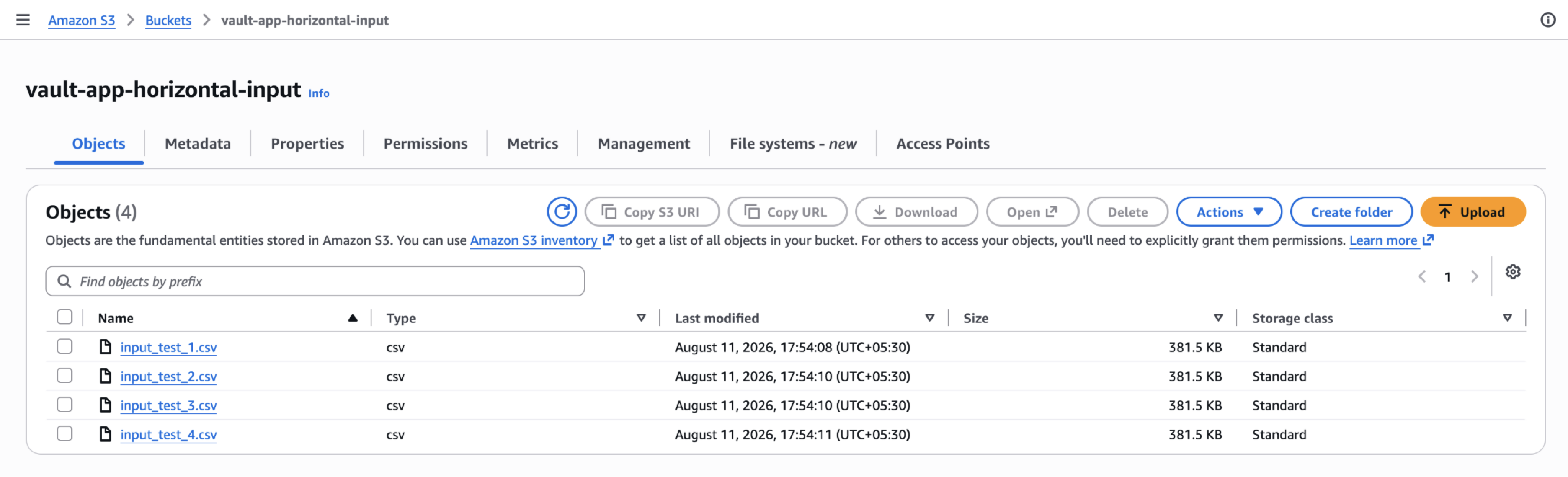
Confirm that the output location does not yet contain processed output files.
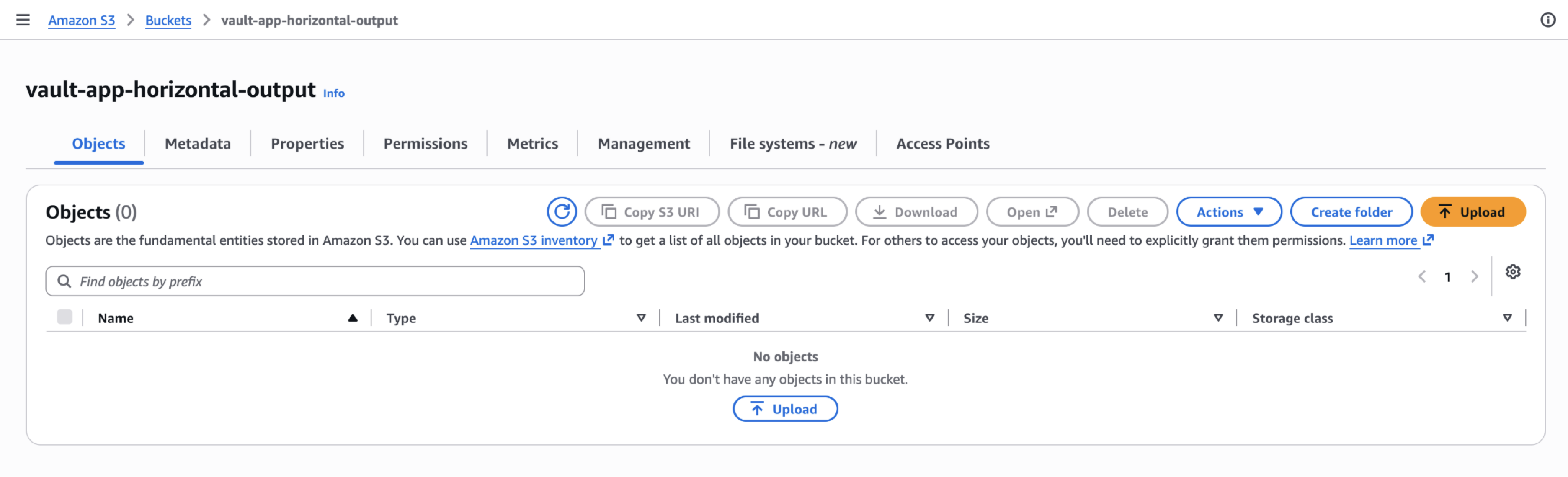
Deploy the StatefulSet:
kubectl apply -f sample-k8s-deployment.yaml

Verify that the number of running pods matches the configured replica count:
kubectl get pods
Review the coordinator logs to confirm that index files are created under .chp/.
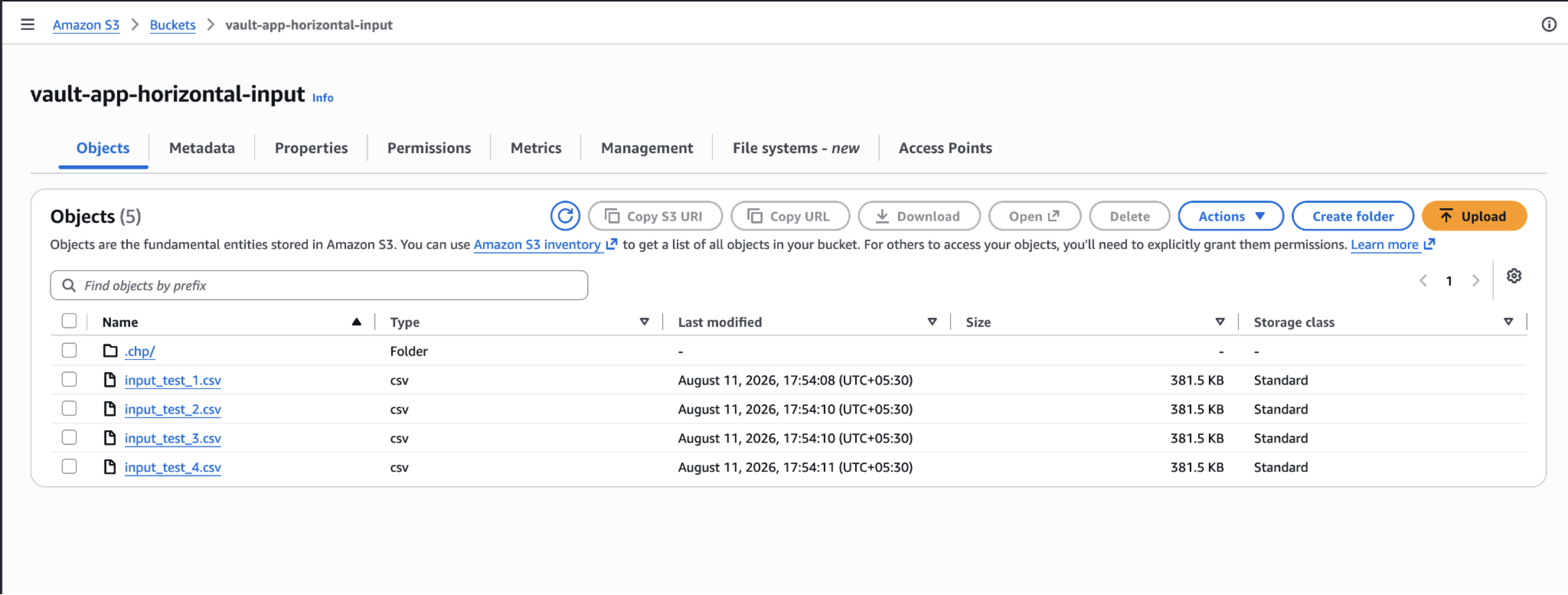
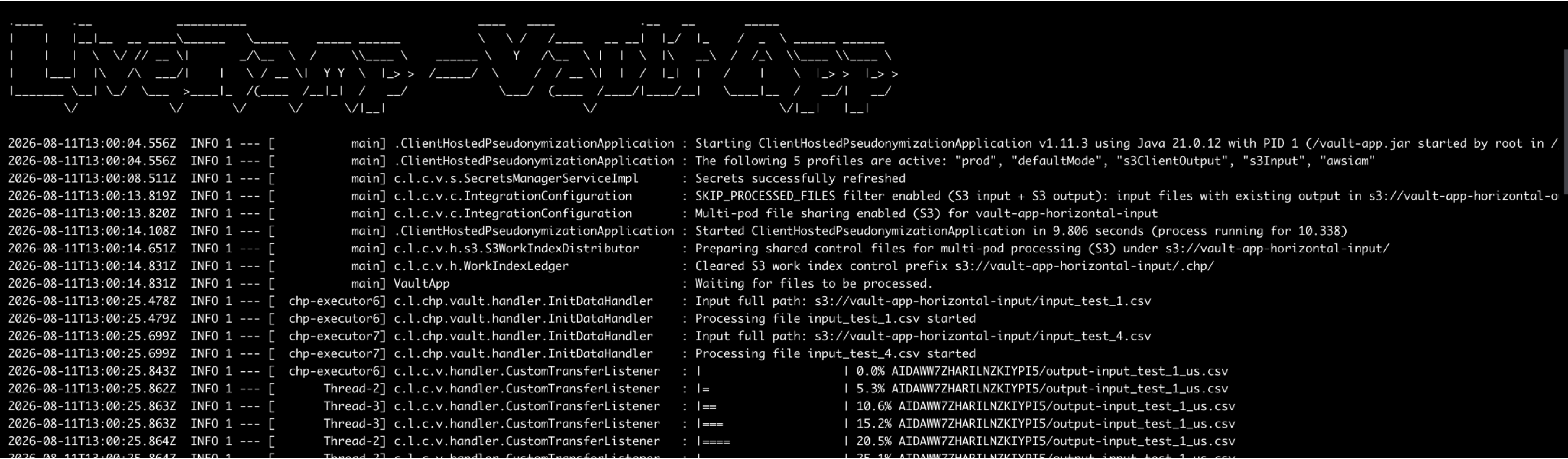
Review worker logs to confirm that each pod reads only its own index and processes assigned files.
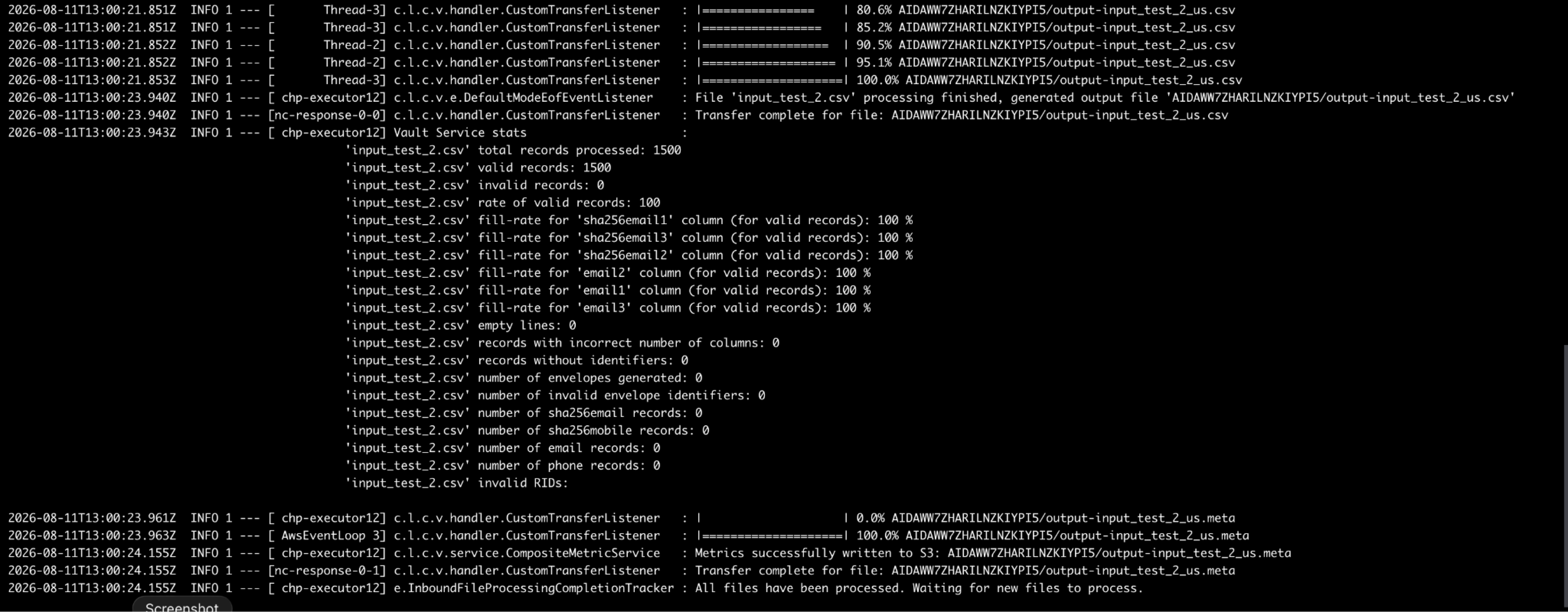
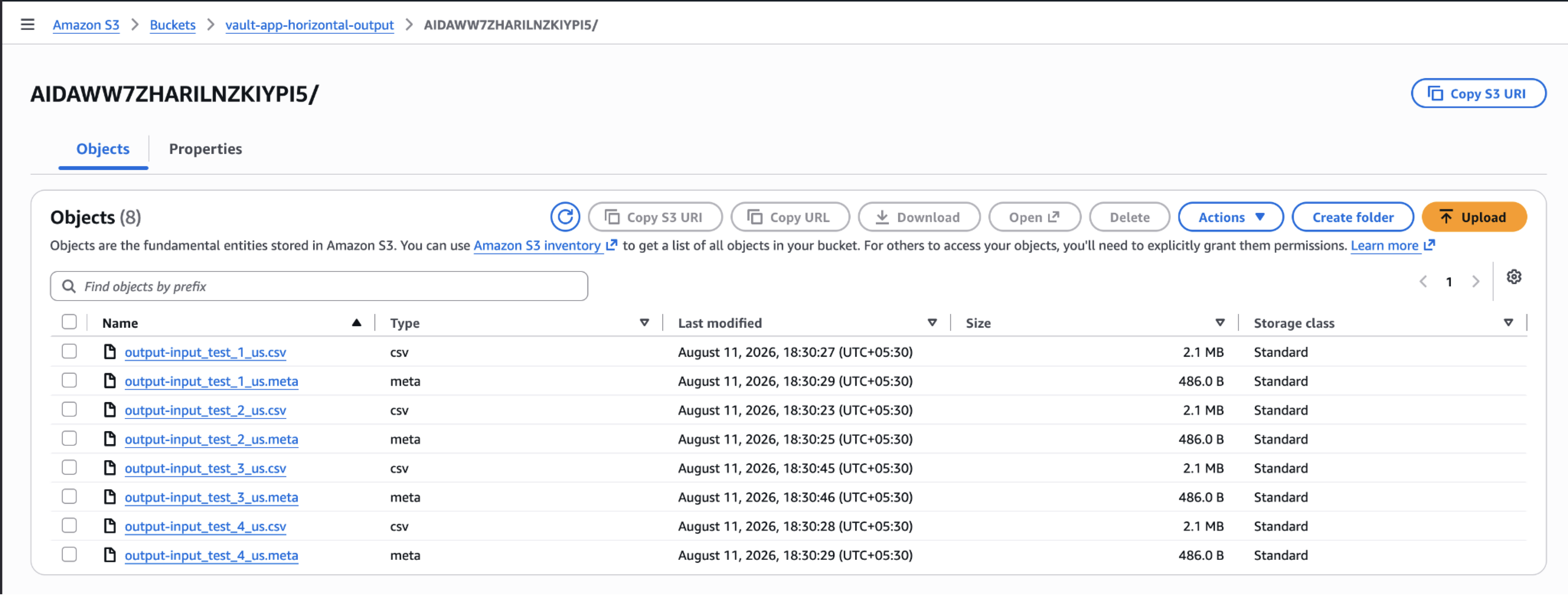
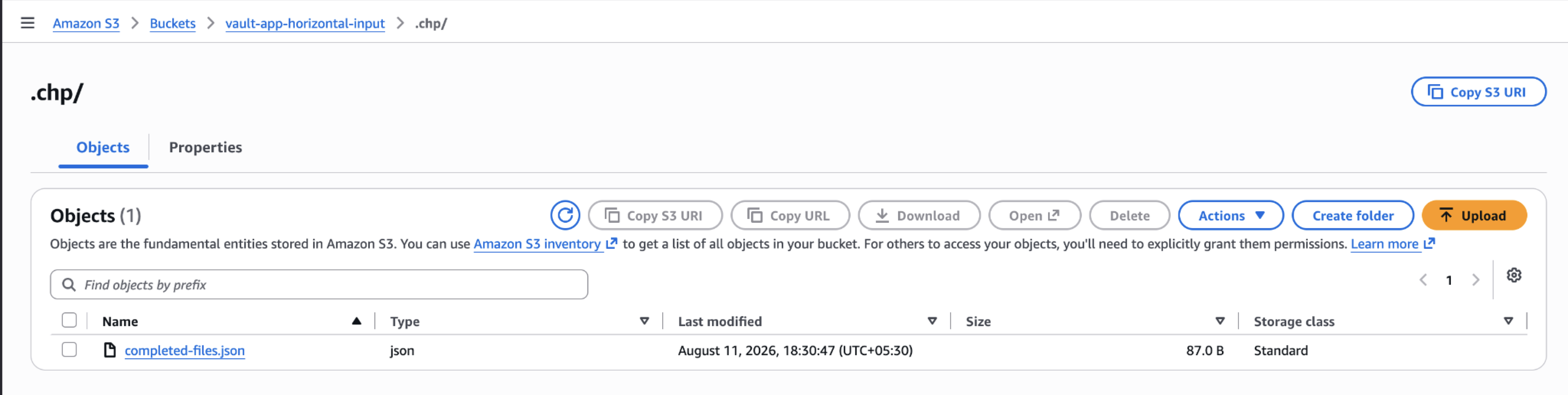
After processing completes, confirm that:
output files were written successfully
completed-files.json contains processed file entries
worker index files were deleted
If new files arrive later, the coordinator can create a new batch after the current batch completes and the input listing changes.