Retrieving Opt-Outs and Deletions from LiveRamp
See the methods that are available for destinations to retrieve opt-outs and deletions from LiveRamp after customers submit data subject rights requests.
When a consumer makes an opt-out or deletion request to LiveRamp directly, or to one of our clients or their partners, we make those requests available to LiveRamp destinations who might receive that consumer's information. We expect these destinations to retrieve and respect these opt-outs or deletion requests; however, the processing of these requests are at the discretion of the destination.
LiveRamp makes opt-out and deletion requests available to destinations via one or more of the following processes:
For partners and clients who receive RampID Mobile Mapping Files, see the "Additional Information for Customers Who Receive RampID Mobile Mapping Files" section below.
Using the Consent Files Service API
Note
The Consent Files Service API should not be used by customers to transmit consumer opt-out or deletion requests to LiveRamp. For information on sending these requests, see "Sending Data Subject Rights Requests".
The Consent Files Service API is built for destinations to retrieve consumer opt-out and deletion requests received directly by LiveRamp or indirectly by LiveRamp from customers. The information provided by the Consent File Services API helps destinations to apply these requests to the correct customer segments within their platforms.
When calling the Consent File Service API, LiveRamp creates batch files of consumer requests ("consent files") that contain lists of identifiers that should either be opted out or deleted.
We also provide related metadata for each file, including:
The type of identifiers in the file.
Whether the file represents opt-outs or deletions.
Whether the request came directly to LiveRamp or to a LiveRamp client.
If the request came to a LiveRamp client currently delivering data to you (i.e., if a consumer made a request to one of our clients and the client forwarded it to LiveRamp), information that specifies where the opt-out or deletion request came from.
Steps to Retrieve Files Via API
Retrieving files via API consists of the following overall steps:
LiveRamp securely distributes API keys to you.
Using the API keys, you query our Consent Files Service API to get a list of all new opt-out and deletion files delivered by LiveRamp since January 1, 2020, along with metadata for each file. See "Example API Response" below for an example.
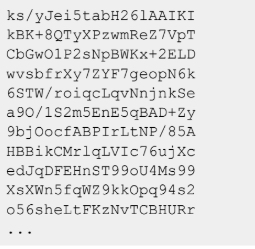
Each object in the API response will include a URL for a text file that contains your opt-outs and deletions. You can make an HTTP GET request against each URL using something like cURL or a programming language HTTP client to download your files. See "Example File" below for an example of what the consent file might look like.
You apply the opt-outs as required to the appropriate client or system accounts.
You continue to call the API on a regular basis to get a list of all new files created since your previous API call.
For complete instructions, see our Consent Files Service API documentation.
Example API Response
Below is an example of what the API responses will look like. See the table below for a list of response parameters and their descriptions.
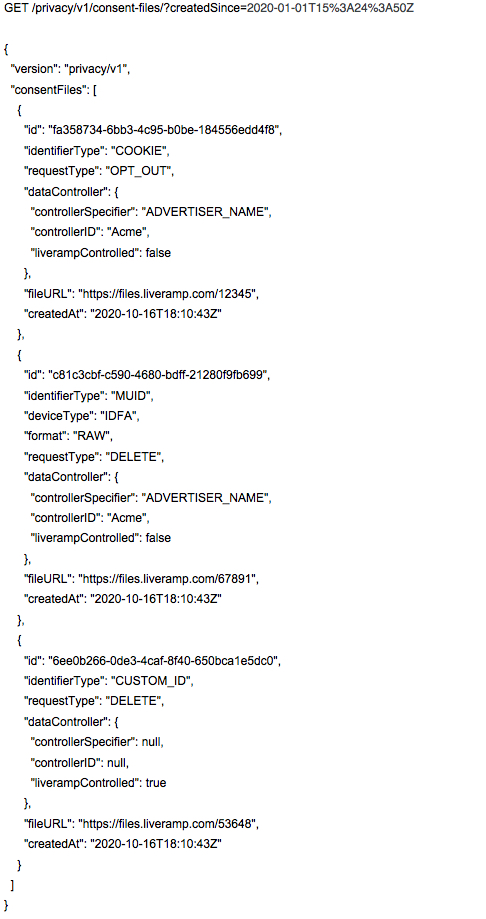
Parameter | Description | Example |
|---|---|---|
id | The consent file ID | |
identifierType | The type of identifiers that the file contains | "MUID", "CUSTOM_ID", "COOKIE" |
muidDeviceType | When the identifierType is "MUID", the type of mobile device ID. "MIXED" indicates that the file contains both AAID and IDFA mobile device IDs | "AAID", "IDFA", "MIXED" |
muidFormat | When the identifierType is "MUID", the format of the identifier values | "RAW", "HASHED" |
requestType | The type of requests that the file contains | "OPT_OUT", "DELETE" |
controllerSpecifier | The type of identifier used in the "controllerID" parameter | "SEATID", "PARTNER_ID", "ADVERTISER_NAME", etc. |
controllerID | The ID for the ID type specified in the "controllerSpecifier" parameter | |
liveRampControlled | Whether the request came to LiveRamp directly. True for requests that came to LiveRamp directly and false for requests that came to someone other than LiveRamp. | "true", "false" |
fileURL | The URL location where the file can be retrieved | |
createdAt | The date and time that the file was created |
Note
LiveRamp will specify clients using the same partner-specific IDs, such as company name, seat ID, and partner ID, to distinguish between clients in existing LiveRamp deliveries to your platform.
Example Consent File
The data in each file consists of a newline-delimited collection of identifiers for your destination. The example below shows 20-digit cookies.
The Trade Desk ID Deletion and Opt Out API
LiveRamp processes data subject rights requests directly with The Trade Desk through integration with their ID Deletion and Opt Out API.
When LiveRamp receives opt-outs and deletion requests, we propagate those changes to:
The advertiser’s first-party audiences on The Trade Desk.
Third-party Data Marketplace segments, including syndicated segments on The Trade Desk.
This integration requires no additional implementation work. LiveRamp will deliver relevant opt-outs and deletions to The Trade Desk on your behalf.
Additional Information for Clients Who Receive RampID Mobile Mapping Files
If you receive RampID Mapping Files containing mobile device IDs (IDFAs or AAIDs), accommodating consumer requests will often be accomplished simply by replacing your existing mapping tables with a full refresh file on a regular cadence. This ensures that your mapping tables are in sync with our online graph and that any linkages we have expired on our end are removed.
However, if your use case requires you to retain linkages longer than this approach allows (for example, longer than 30 days), you can use the consumer request files we provide to remove the necessary linkages on your side directly. Follow the process above to retrieve files using your preferred method.
How Opt-Outs and Deletions Work in Your Mapping Files Today
LiveRamp collects two types of opt-outs: device-based opt-outs and permanent individual-level opt-outs/deletions. You're already receiving device-based opt-outs in your mapping files today, which "zero out" devices or entire clusters as we receive opt-out signals. Any deletions or permanently opted-out users are removed from our graph in accordance with upcoming regulations and are taken care of via the full refresh files you receive (those linkages are no longer included in the refreshed files).
Ensure you are replacing your existing mapping tables with a full refresh file on a regular cadence. This ensures that your mapping tables are in sync with our online graph and that any linkages that have expired on our end are removed. In this case, the additional files serve as a historical record/tracking mechanism.
If your use case requires you to retain linkages longer than this approach allows, use the file we'll provide to remove the necessary linkages on your side.