Keep Destination Data Fresh with Record Sync
Record Sync empowers Activation customers to keep their first-party data fresh, up-to-date, and relevant through the ability to propagate user deletions downstream to supported destination platforms. This enables you to maintain more accurate targeting audiences, which will improve ROI/ROAS by reaching only the right audience at the right time.
To use user deletions through Record Sync, you create a destination connection to a Record-Sync enabled destination. For more information, see "Create a Destination Connection".
How Record Sync Works
For destinations that don't support Record Sync, LiveRamp is only able to share user additions to those destinations and is not able to send user deletions. With Record Sync, we can propagate user deletions to supported destinations when either of the following events occurs:
Newly uploaded files update a segment
Changes in our Identity Graph result in a change to the matches in a segment (for example, when a cookie expires)
When either of these happens, we compare the new data to the previous data for each segment to determine which users were deleted. We then send a delivery job containing the associated identifiers for those deleted users to the destination platform.
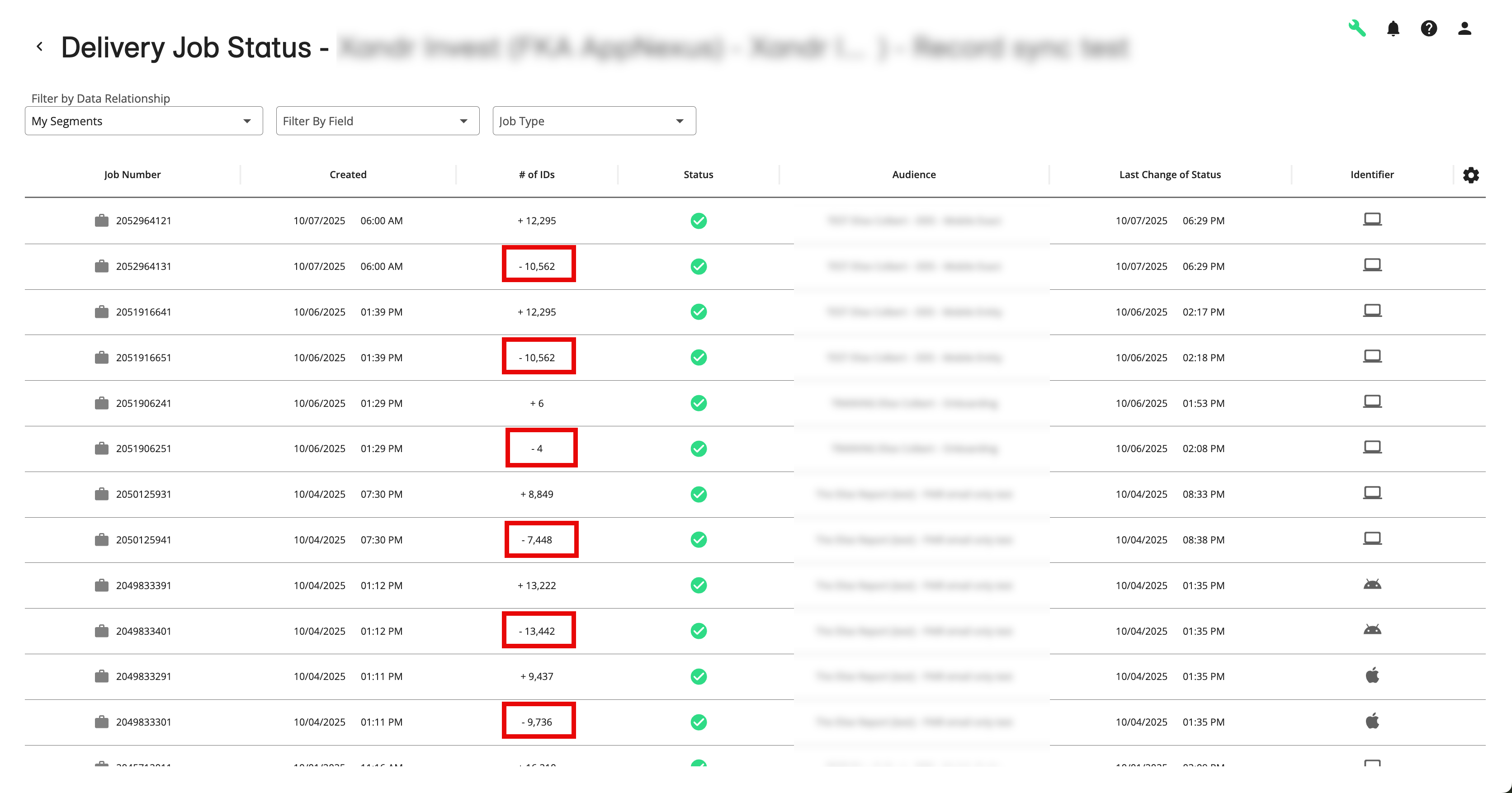
Once Record Sync has been enabled and delivery jobs for deleted users have been sent, you’ll see delivery jobs showing negative numbers in the “#of IDs” column (this column only appears for Record Sync destination accounts):
Note
User deletions will only apply to segments moving forward after implementation - we do not support retroactively sending deletions.
How Record Sync Works with Dataset Update Options
Here's how Record Sync works with each of the dataset update options:
Incremental updates: Will result in deletions if the new data is modifying a single value field (meaning a user can only have one value for that field) and changes an existing user from one value to another.
Note
For datasets with multi-value fields, you should use either the "segment refresh" option or the "full refresh" option to fully capture changes in segment membership.
Segment "refresh": Will result in deletions if an existing user is no longer in the newly updated segment.
Full "refresh": Will result in deletions if an existing user is no longer in the newly updated segment or a segment no longer has records in the dataset.
Note
If you delete a file from a dataset that is using the "full refresh" update option and you're distributing segments from that dataset to one or more Record Sync-enabled destinations, deleting a file might cause those segments to go to zero in the Record Sync destination platforms. To delete a file, create a support case so that LiveRamp can ensure that you don't encounter issues.
Supported Destinations for Record Sync
Currently, the following destinations support Record Sync segment deletions:
Facebook Direct
Google:
Google Display & Video 360 (DV360)
Google Ad Manager
The Trade Desk (1st Party Data Activation)