Data Marketplace Segment Compliance Categories
LiveRamp’s Policy Check automatically assigns compliance categories based on Data Marketplace policies when sellers create and upload new segments or update existing segments in LiveRamp’s Data Marketplace. These compliance categories identify sensitive or restricted segment categories (for example, “Children/Minors” or “Mental Health”), as determined by the segment’s metadata (primarily the segment name and description) and the type of segment it is (e.g., standard or custom).
Note
Compliance categories are currently only visible to data sellers in Connect. They are not visible to data buyers.
Compliance categories help sellers understand whether a segment is restricted by LiveRamp’s Data Marketplace policies so sellers can understand any potential restrictions on their segments. These compliance categories help guide sellers to choose the correct segment type and provide appropriate segment names and descriptions.
Note
Segments with a “Processing” ( ) status in the “Compliance Category” column are still under review by LiveRamp.
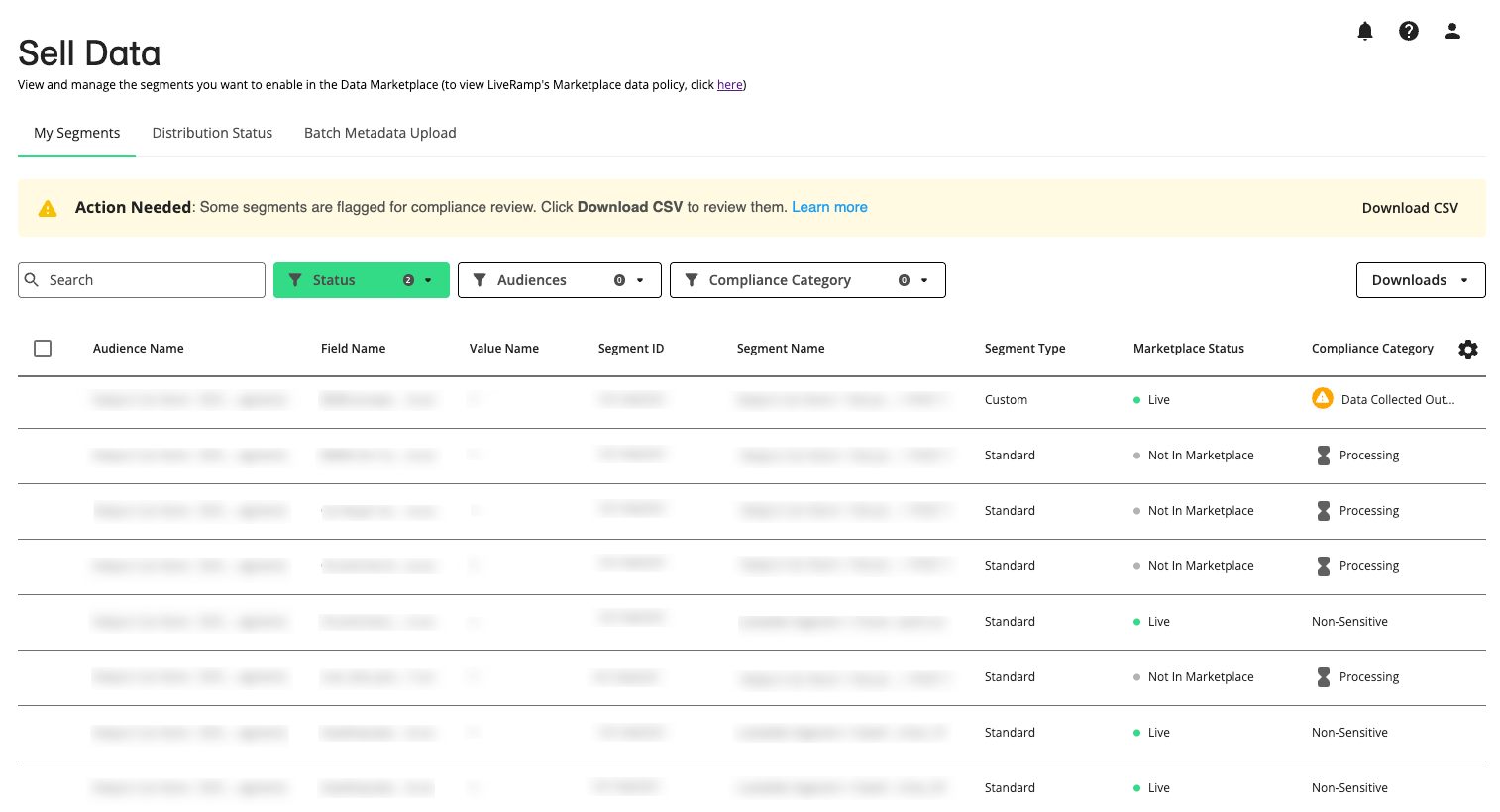
Sellers who have segments assigned a compliance category that is prohibited, have the following recourse:
For segments assigned a compliance category not allowed:
Sellers can revise the segment description of distributed segments and the name or description of non-distributed segments if it might better align with an allowed compliance category in either the UI or by uploading them in a segment metadata file. For more information, see “Reviewing Compliance Categories”.
For standard segments assigned the compliance categories only allowed for custom segments:
Sellers with standard segments assigned the following compliance categories can convert these segments to custom segments.
“Health - Caregivers (Sensitive)”
“Health - Interest or Modeled (Sensitive)”
“Voter Registration Data”
For more information, see “Reviewing Compliance Categories”.
The following tables lists the compliance categories Policy Check automatically assigns to each segment submitted to the Data Marketplace and any restrictions that apply. Standard segments are generally more restricted than custom segments. For an alphabetical list of all compliance categories, see “List of All Compliance Categories” below.
Restricted for Both Standard and Custom Segments
Segments with the following compliance categories are not allowed in LiveRamp’s Data Marketplace. For more information, see “LiveRamp's Data Marketplace Data Policy”.
Compliance Category | Allowed for Standard | Allowed for Custom |
|---|---|---|
Adult Entertainment |
|
|
Biometric or Genetic Data |
|
|
Children/Minors |
|
|
Citizenship or Immigration Status |
|
|
Data Collected Outside USA |
|
|
Health - Known Health Conditions |
|
|
Illegal Weapons |
|
|
Marijuana |
|
|
Mental Health |
|
|
Military Status |
|
|
Precise Geolocation Data |
|
|
Protected Public Service Roles |
|
|
Race/Ethnicity |
|
|
Religion |
|
|
Reproductive Health |
|
|
Sexual Orientation & Gender Identity |
|
|
Sexually Transmitted Diseases |
|
|
Union Membership |
|
|

Restricted for Standard Segments But Allowed for Custom Segments
Segments with the following compliance categories are restricted in LiveRamp’s Data Marketplace if they are standard segments, but allowed if they are custom segments. If your standard segment is assigned one of these compliance categories, you might consider changing the segment type to custom. For more information, see “Reviewing Compliance Categories”.
Compliance Category | Allowed for Standard | Allowed for Custom |
|---|---|---|
Health - Caregivers (Sensitive) |
|
|
Health - Interest or Modeled (Sensitive) |
|
|
Voter Registration Data |
|
|

Allowed for Both Standard and Custom Segments
Standard and custom segments with the compliance category of “Non-Sensitive” are allowed in LiveRamp’s Data Marketplace. For more information, see “LiveRamp's Data Marketplace Data Policy”.
Compliance Category | Allowed for Standard | Allowed for Custom |
|---|---|---|
Non-Sensitive |
|
|
List of All Compliance Categories
The following table lists the available LiveRamp Data Marketplace compliance categories and their associated restrictions.
Compliance Category | Allowed for Standard | Allowed for Custom |
|---|---|---|
Adult Entertainment |
|
|
Biometric or Genetic Data |
|
|
Children/Minors |
|
|
Citizenship or Immigration Status |
|
|
Data Collected Outside USA |
|
|
Health - Caregivers (Sensitive) |
|
|
Health - Interest or Modeled (Sensitive) |
|
|
Health - Known Health Conditions |
|
|
Illegal Weapons |
|
|
Marijuana |
|
|
Mental Health |
|
|
Military Status |
|
|
Non-Sensitive |
|
|
Precise Geolocation Data |
|
|
Protected Public Service Roles |
|
|
Race/Ethnicity |
|
|
Religion |
|
|
Reproductive Health |
|
|
Sexual Orientation & Gender Identity |
|
|
Sexually Transmitted Diseases |
|
|
Union Membership |
|
|
Voter Registration Data |
|
|
Compliance Category FAQs
Policy Check looks at a segment’s metadata, meaning its name and description, plus its segment type (standard or custom). It then assigns a compliance category. Policy Check reviews segment information only. It doesn’t change how a segment is configured or distributed.
It reviews enabled segments. It doesn’t review disabled segments. When you enable a disabled segment, Policy Check reviews it automatically and assigns a compliance category.
No. Compliance categories are currently only visible to sellers in Connect to help manage compliance.
If any of your segments were assigned compliance categories that aren’t allowed, an “Action Needed” banner appears on the Sell Data > My Segments page. Click Download CSV on the banner to get a file of those segments. You can also use the Compliance Category filter on the My Segments page to see only segments with a particular category.
LiveRamp is still reviewing the segment, usually because you just submitted or updated it. A segment in “Processing” () status isn’t discoverable in the Data Marketplace until the review is finished. Distribution to existing destinations isn’t affected.
Not immediately. Segments assigned a sensitive compliance category stay discoverable and can be distributed until January 29, 2027. Before then, you can update the segment so it’s reviewed again. Segments that are still out of policy on January 29, 2027, will be removed from the Data Marketplace. While an updated segment is being reviewed, it isn’t discoverable in the Data Marketplace.
While Policy Check reviews an updated segment, buyers can’t find it in the Data Marketplace. That includes buyers who already distribute it, so it won’t appear in their destination account in Connect. Their existing distributions stay active, though, and the segment keeps going to the same destination platforms. Once the review is finished and the segment is approved, buyers can see it again. Note that this is how all segments under review (flagged or not) are handled.
No. Changing the name of a distributed segment can cause problems on downstream platforms. For a distributed segment, update the description only. If it needs a new name, submit it as a new segment.
Check the “Has Been Distributed” column in the CSV you download from the “Action Needed” banner, or in a downloaded segment metadata file. “Y” means the segment has been distributed.
No. Update the name or description only to describe the segment more accurately. If a segment is meant to target a prohibited topic, it isn’t allowed in the Data Marketplace no matter how it’s worded. That includes segments modeled or derived from other data to infer a prohibited topic.
No. While Policy Check reviews an updated segment, distributed segments keep going to their existing destinations and stay available on downstream platforms. Only discoverability in the Data Marketplace is affected during the review.
If Policy Check approves the updated segment, it’s usually reclassified within minutes. If it doesn’t, the segment is sent to a LiveRamp team for additional compliance review. The segment stays in “Processing” status until that review is finished, and you’ll get an email with the result.
Standard segments assigned one of these compliance categories can be converted:
Health - Caregivers (Sensitive)
Health - Interest or Modeled (Sensitive)
Voter Registration Data
Eligible segments have a “Y” in the “Eligible to Convert” column of the downloaded CSV.
You must have a direct agreement with each account that will receive the segment, covering the data and how it will be used. Custom segments must still follow LiveRamp’s policies.
When you convert the segment, add every destination it was previously distributed to in the “Allowed Platforms (Custom Segments Only)” column. That way, the segment stays available on those platforms.
Segments that are still out of policy on January 29, 2027 will be removed from the Data Marketplace and can no longer be distributed. Tell your clients which segments will be removed and recommend replacement segments where you can.