Getting Started with Identity Resolution in LiveRamp Clean Room (US Data)
LiveRamp makes it safe and easy to connect data, and we've built our identity infrastructure capabilities into LiveRamp Clean Room to allow you to resolve and connect data directly where it lives.
This capability ensures data owners in LiveRamp Clean Room can collaborate with partners on LiveRamp Identity as needed, driving an enhanced match within clean room questions and enabling seamless activation of segments built within the clean room. These capabilities can power both marketing and advertising use cases.
Note
For more information on RampIDs, see “RampIDs”.
For more information on Known IDs, see "LiveRamp Known IDs".
For information on identity resolution for non-US data, see “Getting Started with Identity Resolution in LiveRamp Clean Room (Non-US Data)”.
Identity resolution in LiveRamp Clean Room is only available for Hybrid and Confidential Computing clean rooms.
You can also choose to do identity resolution using other methods that take place outside of LiveRamp Clean Room (such as using our Embedded Identity in Cloud Environments solution, using LiveRamp’s Local Encoder solution, or resolving your data by uploading it into LiveRamp Connect). Talk to your LiveRamp representative to get more information on these options.
Overview
Identity Resolution in LiveRamp Clean Room allows each customer to connect all of their CID-keyed datasets with their partners’ CID-keyed datasets in clean room questions, while LiveRamp uses RampIDs or Known IDs in the background to create the best possible match between the two sides.
To do this, each clean room question (query) utilizes a “mapping” dataset that maps a customer’s CIDs to a LiveRamp identifier (either Known IDs for marketing use cases or RampIDs for advertising use cases). The mapping datasets are then used to join each customer’s datasets with their partners’s datasets on the LiveRamp identifiers in clean room questions.
This allows each customer to keep their data organized around their own CIDs and join their CRM, conversion, exposure, or other datasets the same way they normally would. For clean room questions that use more than one customer’s data, the data is joined on the LiveRamp identifier to make those partner-to-partner connections more accurate and more interoperable. This gives customers a collaboration workflow that stays anonymous and privacy-conscious, while still making the combined data useful for overlap analysis, audience insights, measurement, and other advertising and marketing use cases.
To generate these mapping datasets, you connect your universe dataset to LiveRamp Clean Room. This universe dataset is required to have a CID (custom identifier) for each row. This should represent how you define a customer within your own systems.
Note
A universe dataset is your entire set of data (PII, device data, etc.) that needs to be resolved and unified. This is typically your full customer dataset across CRM-based data, subscriber data, or transaction data. By using the full universe, LiveRamp is able to optimize the fit of our graph to your view of the customer, ensuring analytics use cases can be executed with minimal conflicts.
The more identifier touchpoints you provide per CID, the higher the fidelity of the match and the greater the recognition rate with clean room partners will be. We recommend using plaintext PII (tied to CID) as the primary identifier whenever possible.
Your universe dataset will be connected at source. Data connections can be configured to any cloud-based storage location, including AWS, GCS, Azure Blob, Snowflake, Google BigQuery, and Databricks (for more information, see the articles in the “Connect to Cloud-Based Data” section of our documentation site).
Once you connect your universe dataset, LiveRamp uses the included identifiers for matching to create two additional linked datasets that map the provided CIDs with their associated LiveRamp identifiers:
One dataset that maps your CIDs to Known IDs (for marketing use case questions)
One dataset that maps an MD5-hashed version of your CIDs to RampIDs (for advertising use case questions)
These mapping datasets are then used in clean room questions to allow joining datasets between partners on Known IDs or RampIDs.
You can then create data connections for your other datasets, such as attribute data, conversions data, or exposure data. For these datasets, you include a column of the appropriate type of CIDs (and do not need to include any other identifiers):
Marketing use cases: Additional datasets to be used in marketing use cases should be connected with the same type of CID that was included in your universe dataset so that those datasets can be joined with the CID | Known ID mapping dataset.
Advertising use cases: Additional datasets to be used in advertising use cases should be connected with an MD5- hashed version of the same type of CID that was included in your universe dataset so that they can be joined with the Hashed CID | RampID mapping dataset (the CIDs are MD5 hashed to maintain the pseudonymity of the RampIDs).
The identity resolution process is refreshed monthly on your universe dataset, based on the date you configure (other datasets will always be up-to-date because we access that data at source during question runs).
Overall Steps
Using identity resolution in LiveRamp Clean Room involves the following overall steps:
You create a data connection for your universe dataset.
You perform field mapping for the universe dataset (which involves mapping the fields, adding metadata, and scheduling identity resolution).
LiveRamp creates two linked mapping datasets: containing a mapping of MD5-hashed CIDs | RampIDs.
A mapping of CIDs | Known IDs
A mapping of MD5-hashed CIDs | RampIDs
You create additional data connections for other datasets (such as attribute data, conversions data, or exposure data), keyed off of the appropriate type of CIDs (depending on your use case and the type of CIDs included in the universe dataset).
Your and your partners create and run clean room questions that use the linked dataset and other datasets keyed off of MD5-hashed CIDs.
For more information on performing these steps, see the sections below.
Format a Universe Dataset (US Data)
Before creating the data connection for your US data universe dataset, make sure it’s formatted correctly.
Note
For information on formatting a non-US data universe dataset, see “Format a Universe Dataset (Non-US Data)”.
The universe dataset should represent your full audience and should include all user identifiers (PII touchpoints and/or online identifiers) that will be used during identity resolution to resolve to Known IDs and RampIDs.
Note
Only PII touchpoints (such as name, postal, email, and phone) will be used to resolve to Known IDs. PII touchpoints and online identifiers (such as cookies, MAIDs, and IP addresses) will be used to resolve to RampIDs.
LiveRamp uses this dataset to create a mapping between your CIDs and their associated LiveRamp identifiers (Known IDs or RampIDs). These mappings live in two linked datasets and allow you to use Known IDs (for marketing use cases) or RampIDs (for advertising use cases) as the join key between each partner's datasets in queries.
When formatting your universe dataset, multiple identifier types (including PII, hashed email, and MAIDs) can be included in the same dataset. The examples below can be used for the specific situations listed but you can create a dataset that uses any combination of these identifiers. See the table below for a list of the suggested columns for a universe dataset containing plaintext PII, hashed emails, and MAIDs.
For information on formatting and hashing identifiers, see “Formatting Identifiers”.
Note
When sending PII, it’s important that as many PII touchpoints as possible are provided for LiveRamp’s identity resolution capabilities to yield the best results.
You do not need to include columns for any identifiers that you’re not including in the dataset.
You do not need to include any attribute data columns (or any other non-identifier columns), since these will not be needed for identity resolution and will not be retained in the resulting CID | Known ID and Hashed CID | RampID mapping datasets. Removing attribute columns can help with faster processing times.
Your CRM dataset might also be able to function as a universe dataset.
Datasets that will be used in identity resolution must not contain BOM characters. For more information, see “Removing BOM Characters”.
Field Contents | Recommended Field Name | Field Type | Values Required? | Description/Notes |
|---|---|---|---|---|
A unique user ID | cid | string | Yes |
|
Consumer’s first name |
| string | Yes (if Name and Postal is used as an identifier) |
|
Consumer’s last name |
| string | Yes (if Name and Postal is used as an identifier) |
|
Consumer’s address |
| string | Yes (if Name and Postal is used as an identifier) |
|
Consumer’s additional address information |
| string | No |
|
Consumer’s city |
| string | No |
|
Consumer’s state |
| string | No |
|
Consumer’s ZIP Code or postal code |
| string | Yes (if Name and Postal is used as an identifier) |
|
Consumer’s best email address |
| string | Yes (if email is used as an identifier) |
|
Consumer’s SHA-1-hashed email address |
| string | No |
|
Consumer’s SHA256-hashed email address |
| string | No |
|
Consumer’s MD5-hashed email address |
| string | No |
|
Consumer’s best phone number |
| string | Yes (if phone is used as an identifier) |
|
Consumer’s best hashed phone number |
| string | Yes (if hashed phone is used as an identifier) |
|
Consumer's mobile device ID (MAID) |
| string | Yes (if MAIDs are used as identifiers) |
|
Consumer's hashed mobile device ID (MAID) |
| string | Yes (if hashed MAIDs are used as identifiers) |
|
Create the Universe Dataset Data Connection
Once your universe dataset has been formatted, create the data connection to that dataset in LiveRamp Clean Room. Follow the instructions for your cloud provider in "Connect to Cloud-Based Data", making sure to use the appropriate article for a Hybrid clean room connection (rather than a cloud native-pattern clean room).
When a connection is initially configured, it will show "Verifying Access" as the configuration status on the Data Connections page. Once the connection is confirmed and the status has changed to "Mapping Required" (usually within 4 hours), map the table's fields.
Perform Field Mapping
As part of this process, once the connection is confirmed, you’ll perform mapping. This process involves several individual steps:
Mapping the dataset fields
Adding metadata
Scheduling identity resolution
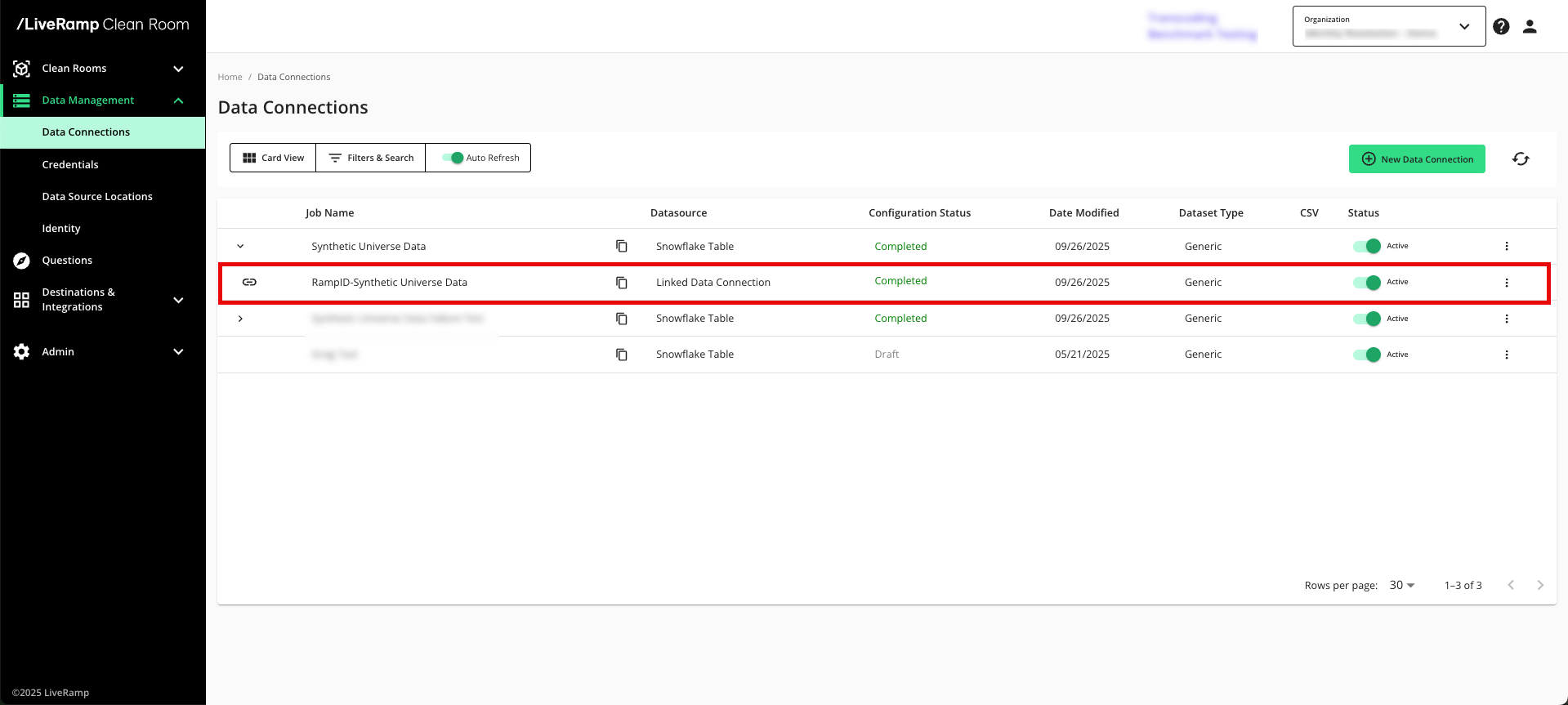
Once this process has been completed, the linked datasets containing the CID | Known ID mapping and the MD5-hashed CID | RampID mapping appear on the Data Connections page as child elements under the data connection you created in the previous step.
Map the Fields
During the field mapping step, you specify which columns to include in the identity resolution process:
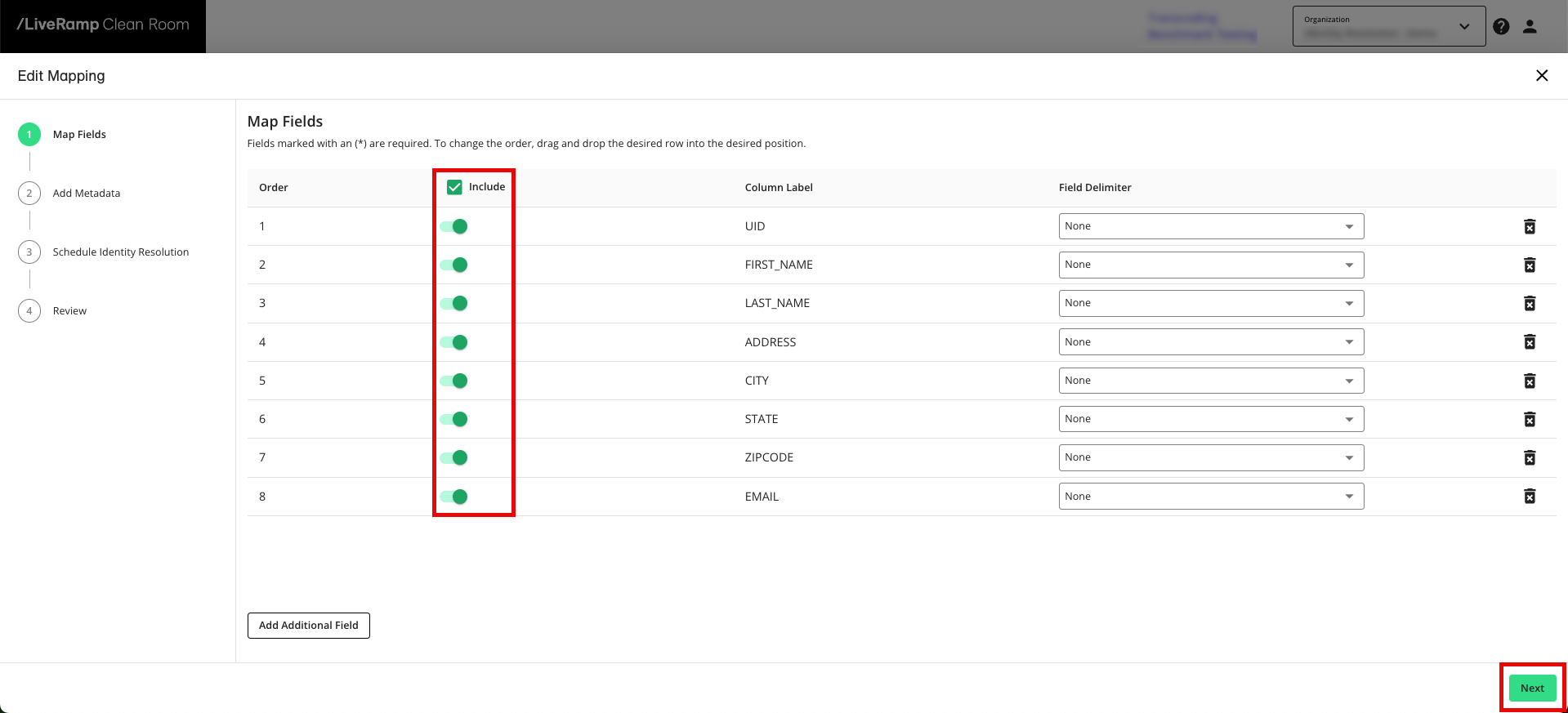
From the row for the newly created data connection, click the More Options menu (the three dots) and then click Edit Mapping.
Slide the Include toggle to the right for your CID column and any identifier columns.
Note
You do not need to include any attribute data columns (or any other non-identifier columns), since these will not be needed for identity resolution and will not be retained in the resulting mapping datasets. Removing attribute columns can help with faster processing times.
Click to advance to the Add Metadata step.
Add Metadata
After you map the fields, you’ll add metadata for each field:
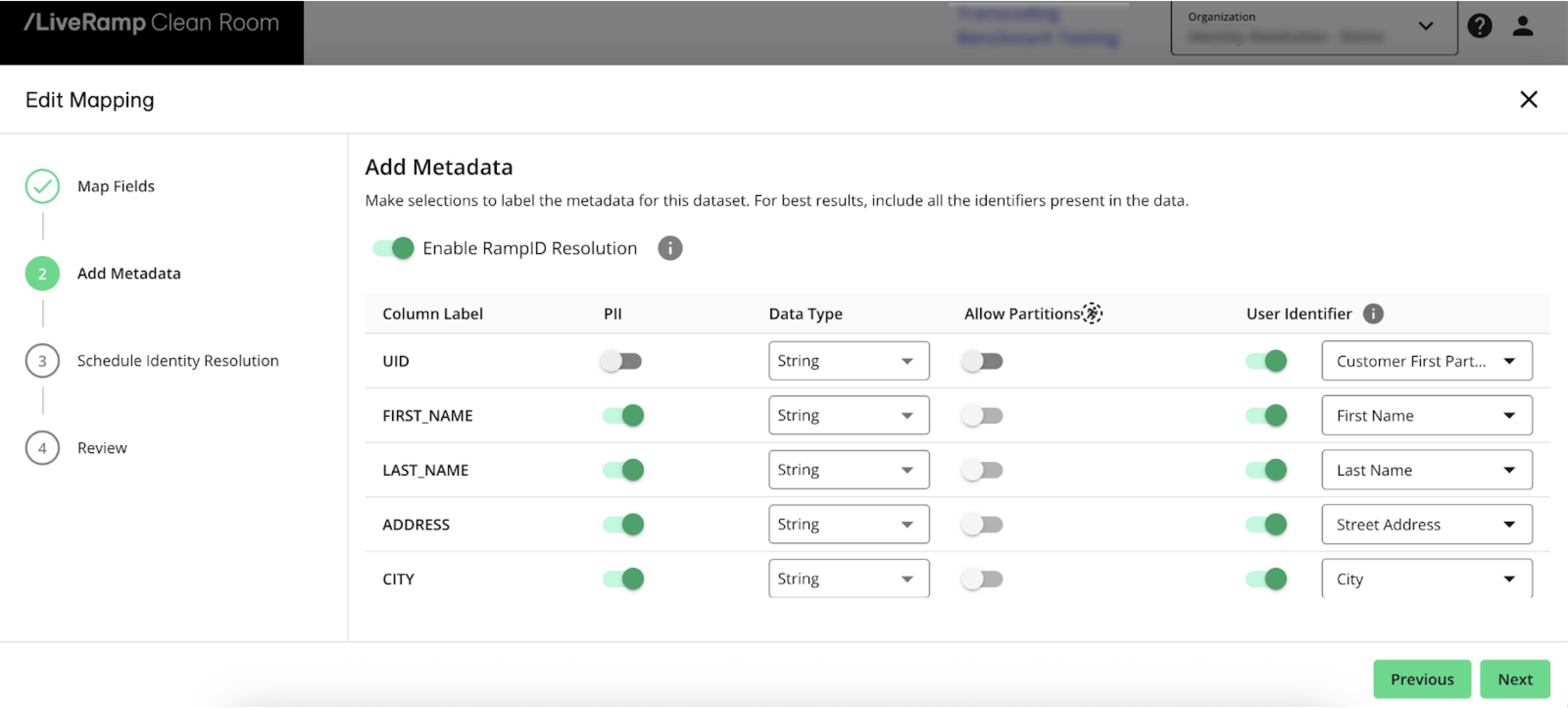
Slide the Enable LiveRamp Identity toggle to the right to enable the Identity Resolution process.
For the column containing CIDs:
Slide the User Identifier toggle to the right
Select Customer First Party Identifier as the identifier type
For columns containing identifiers:
Slide the PII toggle to the right
Slide the User Identifier toggle to the right
Select the appropriate identifier type
Click to advance to the Schedule Identity Resolution step.
Schedule Identity Resolution
Universe mappings are updated monthly and can be configured to run on specific dates as needed:
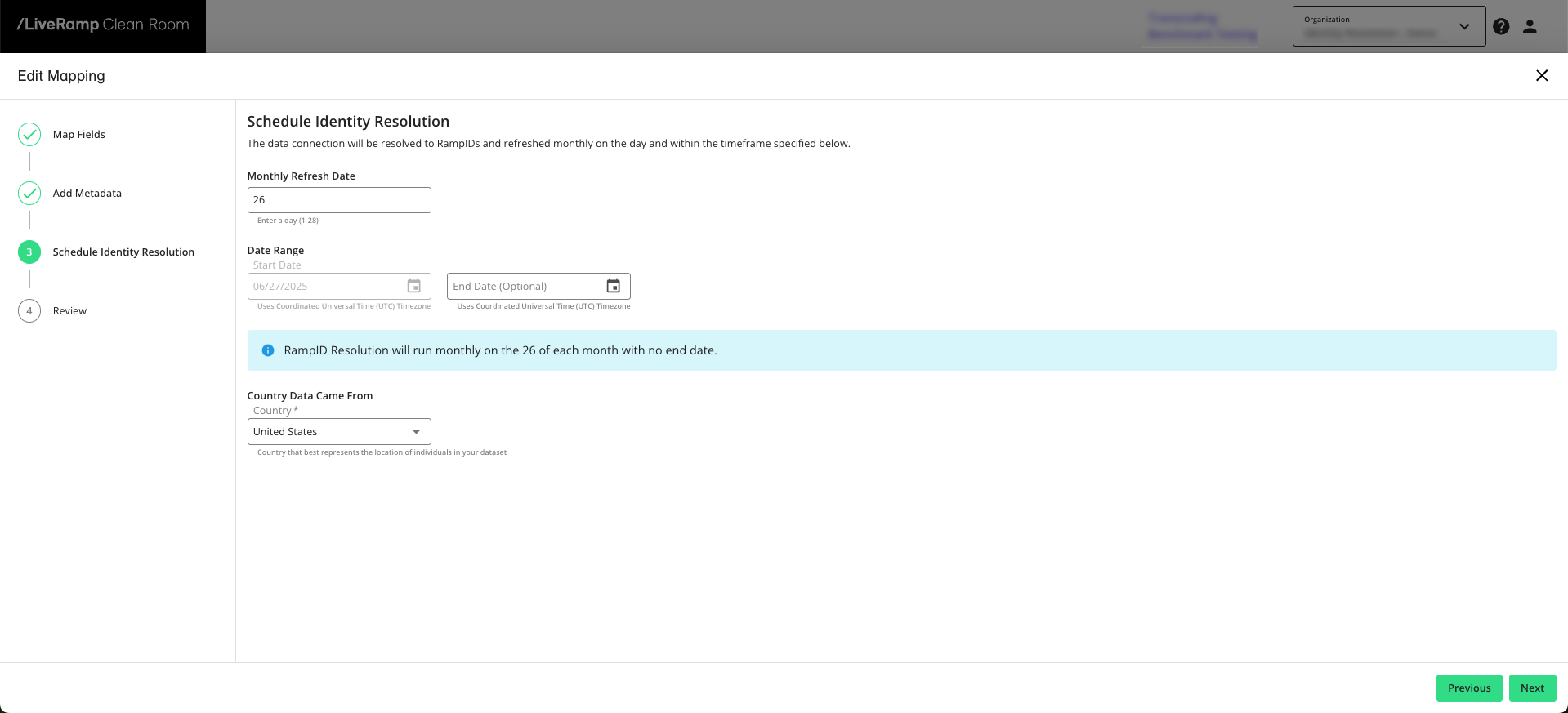
Enter the day of the month you’d like the dataset refresh to be performed.
Enter the refresh start date or select it from the calendar.
If needed, enter the refresh end date or select it from the calendar.
Note
All dates use Coordinated Universal Time (UTC).
Click to advance to the Review step.
Once you’ve reviewed the information, click .
Once you’ve completed the steps above, the identity resolution job begins processing.
The configuration status for the data connection shows ”Job Processing" as the configuration status, which indicates that the universe dataset is being processed into the CID | Known ID and hashed CID | RampID mappings. This status should only display for a few hours (no more than 10).
Once the configuration status changes to “Completed”, the linked datasets are displayed underneath your universe dataset data connection and the linked datasets are now ready to be provisioned to clean rooms.
Note
Any job that shows a “Failed” status will include a message, displayed as a tooltip. Contact your LiveRamp account team or create a support case with the error message to troubleshoot the issue.
Create Data Connections for Other Datasets
If you haven't already done so, create data connections for your other datasets (such as CRM/attribute data, conversions data, or exposure data), keyed off of CIDs in the format used in the universe file (for marketing workflows) or MD5-hashed CIDs (for advertising workflows). When these datasets are used in clean room questions, you'll be able to join them on the CIDs in the appropriate mapping dataset, depending on whether you’re using a marketing workflow or an advertising workflow.
For more information on creating these data connections, see "Connect to Cloud-Based Data".
Provision Datasets to Clean Rooms
Once the above steps have been completed, you can provision the linked mapping datasets to clean rooms. You can also then provision any additional datasets (keyed off of CIDs or hashed CIDs).
Note
Do not provision the parent universe dataset (the dataset containing PII) to a clean room for a RampID or Known ID workflow.
When creating a clean room with RampID as the join key, you will need to confirm that your organization meets certain requirements around the use of RampIDs by reviewing the linked document and confirming that you accept the terms.
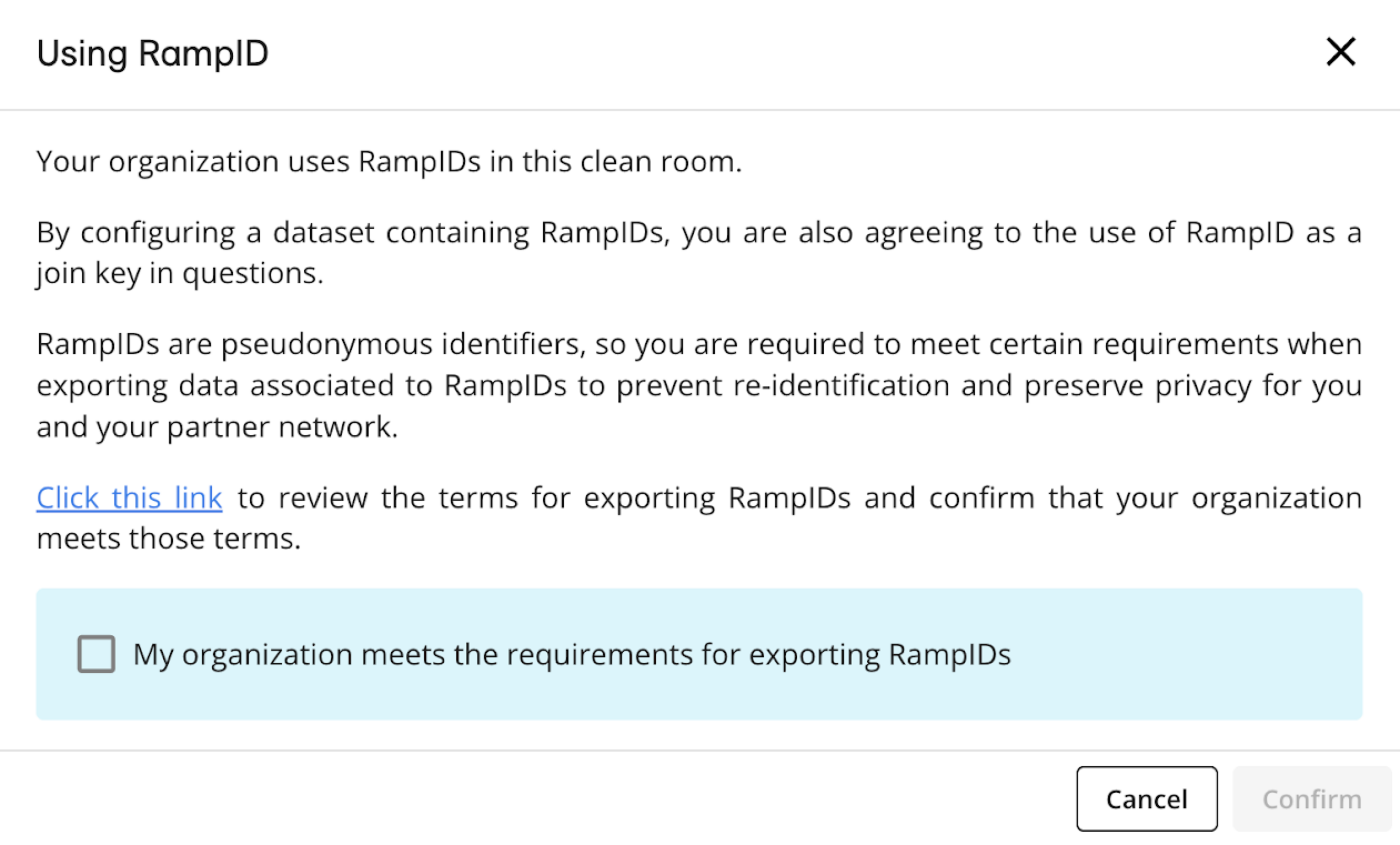
When you provision the linked CID | RampID dataset to the clean room, an acceptance box is displayed to confirm your agreement to use RampID as the join key.
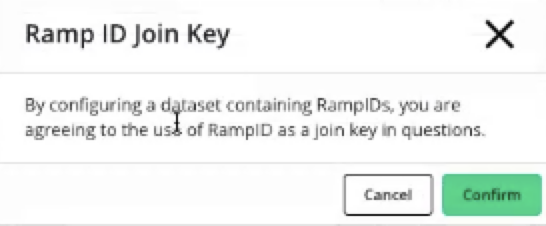
Clean rooms may contain datasets containing hashed PII and datasets containing RampIDs, but you cannot use a PII dataset and a RampID dataset in the context of the same question.
Create and Run Questions
Once you’ve provisioned the necessary datasets to the clean room, you can use them in question runs.
When creating a question:
For marketing use cases, use the CIDs with the CID | Known ID mapping to join across your datasets. Then use Known IDs as the join key between your joined data and your partner’s joined data.
For advertising use cases, use the MD5-hashed CIDs with the hashed CID | RampID mapping to join across your datasets. Then use RampIDs as the join key between your joined data and your partner’s joined data.
For more information on creating and running questions, see “Question Builder”.